CMS for Largest Insurance Company in India is an Indian state-owned insurance group and investment corporation owned by the Government of India.The project was implementing a Content repository, Data exchange and Integration Solution for the largest Insurance company in India.
Business requirements:
-
A single easy-to-use interface for the Business users/ Marketing team to publish various types of content for their Agents, Clients and General Public
-
Content Workflow that supports preview and publish capabilities
-
Support for different types of rich multimedia content
-
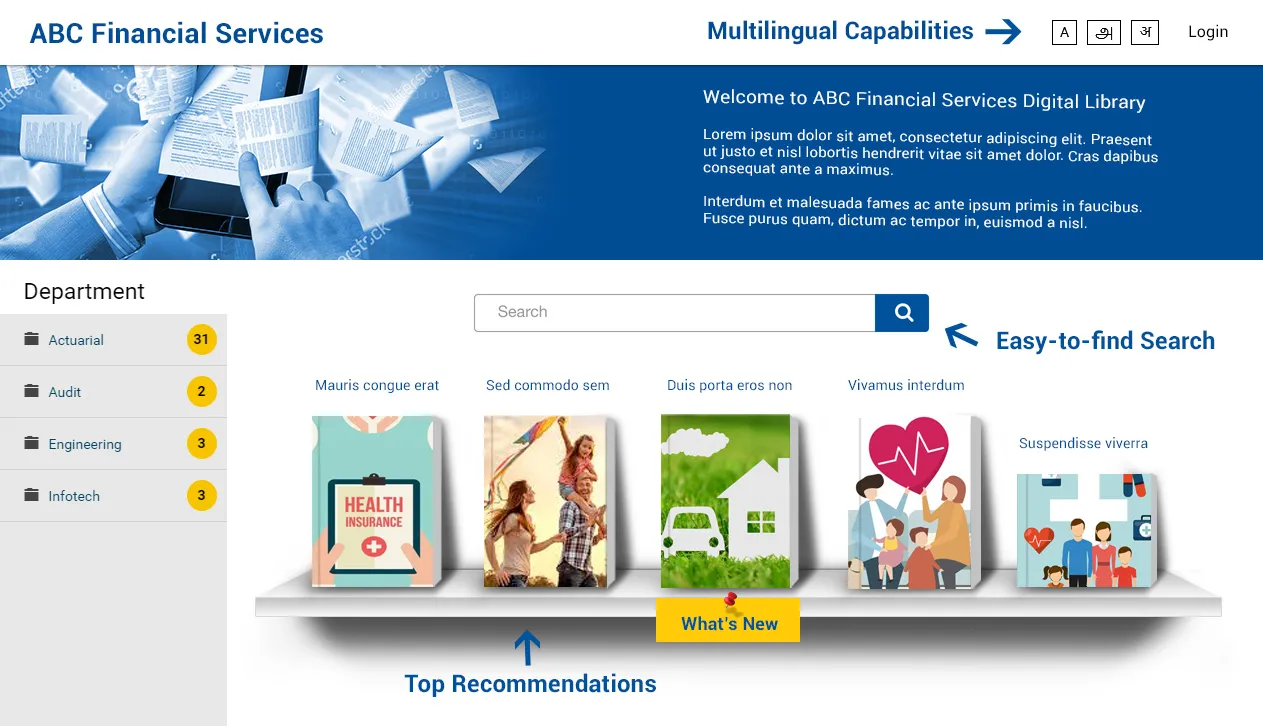
Incorporation of a Unified Content Search
-
Support Content exchange between the CMS and the extJS Agent/Client Portal
-
Multilingual Capabilities
About the project
The Solution:
The Solution Provided was a Headless Drupal Implementation. It was an easy to use Editor interface that helps publish different types of content and is available as standard web services for the Agent/Client Portal built in extJS.
Content Management Tools - Interfaces with which editors could easily create and edit content.The editors would be provided with a WYSIWYG editor using which content can be formatted interactively.
Multimedia Asset Creation - Images and Videos
Videos can be either uploaded to the site or embedded through a third-party site.
Content Publishing Workflow - allowed a multi-stage publishing process involving authors, reviewers / publishers. Depending on the type of content and the publishing process, suitable workflows can be created.
Web services - Web services will be built as standard REST APIs. REST utilizes HTTP methods, such as GET, POST, and DELETE. Provides services as JSON or XML formats
Content Search
Drupal’s integration with Apache Solr and Provision to build Custom Views can be leveraged to build Search Interfaces. Custom views or displays can be built or configured using Views module.
User Management
Editors and Admins are the main user roles in the system. The authentication was through the Integrate with existing IDM.
Why Drupal was chosen
This Drupal implementation was a headless implementation with extJS as the front end. The key reasons for Drupal to be the choice of CMS include:
-
Content Management Tools & Experience for Editors
-
Powerful Content modelling tools
-
Web services for Content in standard formats & API capabilities
-
Ready integration with Solr Search
-
Conformance to Enterprise Security, Performance and Scalability needs
Workflow
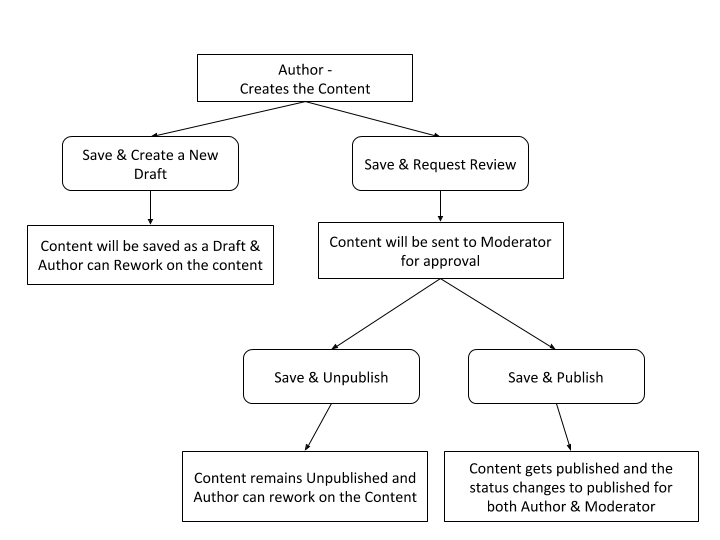
Editorial Interface is designed with a Maker-Checker principle and primarily consists of two roles.
-
Author - Creates Content
-
Moderator - Approves Content
The process has been captured in the following FlowChart.
Integrate with existing IDM
-
Powerful user login was integrated with Identity management to fetch the role and for authentication.
-
The User creation was also integrated with the IDM and only Users in the IDM could be created in the system.
Technical Specifications
Drupal version:
Key modules/theme/distribution used:
Auto Slave
This module provides a database driver (called "autoslave") that will automatically use the database slaves where applicable and otherwise use a master database. In the case of LIC this was used to set up a high availability environment in their private cloud.
Better Messages
This provides "Popup-like" Drupal messages. Better Messages intends to let us control where and how we want to see Drupal messages such as saving or editing any configurations.
Colorbox
This is used to display Images, iframes or inline content etc. in an overlay above the current page.
Dynamic File PDF
This is used to output a view as a PDF document. Each field of the view can be placed on the PDF page directly in the administration interface but are limited to HTML.
We can specify a background PDF document to put unlimited static content to the dynamic PDF. This static PDF can be exchanged dynamically by using a File Field. The PDF can be created by any PDF creator such as Adobe Acrobat Professional or Open Office.
FAQs
The Frequently Asked Questions (faq) is used to allow users, with appropriate permissions, to create question and answer pairs which they want displayed on the 'faq' page. The 'faq' page is automatically generated from the FAQ nodes configured. The standard components were then themed to the requirements of the Project.
Focal point
Focal Point is used to specify the portion of an image that is most important. This information can be used when the image is cropped or cropped and scaled.
No request new Pass
This is used to remove the "Request new password" link from the block and user page.
Role Based theme Switcher
This is used for users to set the different themes for different Roles such as Site Admin, Content Editor and so on.