Sector(s)
Project Team
- Ashutosh Singh: Technical Lead, L1
- Manjit Singh: Senior Frontend Developer, L2
- Mohit Bahl: Former Technical Lead
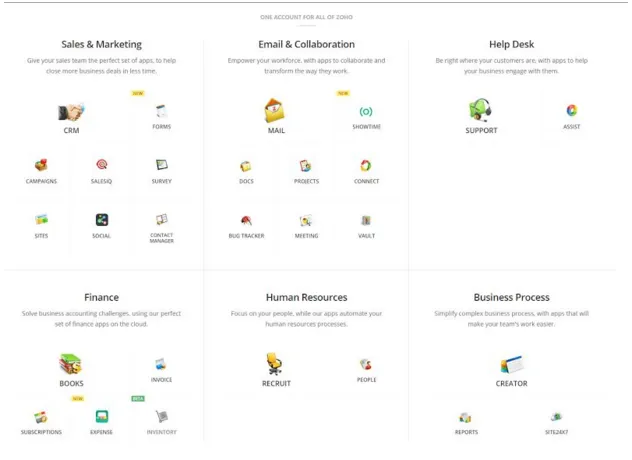
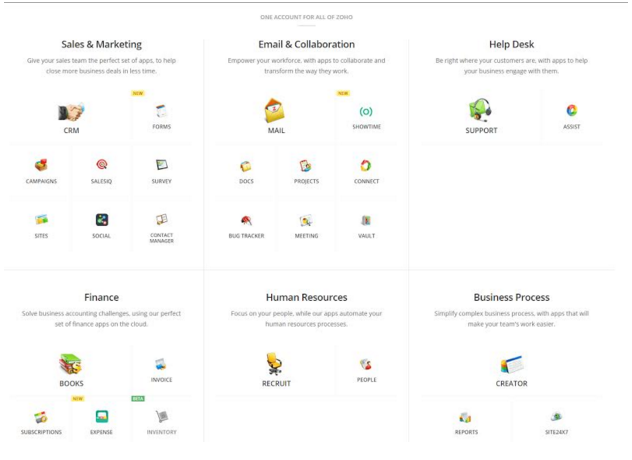
Our client is a leading cloud-based company offers an integrated suite of products designed to simplify business workflows, enhance sales, and boost productivity. Serving over 30 million users, it provides organizations of all sizes the tools to manage their operations entirely on the cloud with a comprehensive suite of 40+ applications.
Key HIghlights
- New Drupal Enterprise CMS allows the company to manage its existing architecture, with its large number of pages, and scale them up as the business grows
- Drupal supports different stages of content development: producing, managing, and distributing existing content, as well as archiving vast amounts of content.
- A responsive layout allows the site to function across platforms such as mobile devices, tablets, and desktops
- A simple user interface which eliminated the dependency of the communication team on developers.
- Drupal was used to create organizational structure mapping, so that different groups and user roles could be created for each product team to give them specific rights.
- To prevent any loss of data during website migration, we scraped it all from the website, and then the new CMS was populated.
About the project
The Challenges
The primary challenge for our client was to efficiently manage and scale its content creation.
At the start of the project the client had over 2000 pages, and no CMS in place. The site was being managed using static files. This meant that
- Adding new content/pages, or editing old content was not possible for their teams
- As their new products were released, managing the growing number of pages became increasingly cumbersome
The Goal
the client wanted a simplified solution which could ensure easy content management and render web pages directly. Their team decided to implement a new CMS that makes it easier to manage their content and render web pages directly.
The Solution
To address the challenges the client was facing, we used Drupal to create organizational structure mapping so that different groups and user roles could be created for each product team to give them specific rights.
The solution implemented by us has the following features:
- Easy‐to‐use interface: A simplified user interface ensures that users only have to work with content, not code. This eliminates the dependency of the communication team on developers.
- Dynamic content management and maintenance: A customizable editorial workflow, integrated with access control features, lets users seamlessly manage the content. Based on the organization’s structure, it gives different access rights to each user editing the content. Also, the user is given access only on the basis of the product groups they are designated to handle.
- Customized content management and maintenance: Depending on the organization's structure, only users who are given certain access rights are allowed to manage and edit the website's content, based on the product groups they are designated to handle.
- Handling all phases of content: The solution supports different stages of content development: producing fresh content, managing and distributing existing content, as well as archiving vast amounts of content.
- Flexibility: To allow content creation from multiple sources, we implemented panels. This provided the flexibility to add blogs and HTML‐based content in the product pages.
- Responsiveness: With Drupal, the client got a responsive layout, allowing their site to function across platforms such as mobile devices, tablets, and desktops.
All these features made it an ideal solution for the client to handle the massive data on its website.
Why Drupal was chosen
The client's website is a marketing website that showcases all their products, and gives users more information about them. This site is also a gateway to all the product websites, where users can find plenty of information to help them make a buying decision. The company has several products under its ambit, and every product needed a huge number of pages, which included sections like pricing, features, etc. The CRM page alone has close to 300 pages, and together, all the pages of the different products have more than 2,000 pages.
The marketing and technical writer teams for each product draft the content for their product pages, which is then passed to a central creative team. This centralized team then creates the layout, and makes the content live on the website. The entire website was managed directly using static files, without any CMS. To make any changes in the existing pages, the central team again had to get involved.
The existing process was cumbersome, and, as the number of pages were increasing with the products, it was not scalable.
In response, we demonstrated a Proof of Concept (POC) and used Drupal as the CMS to power certain pages of the website. Besides this, a workflow was also created for the home page so that only specific users had the rights to access and manage the content.
the client liked the POC and was convinced that Drupal was the CMS to go with. They also felt confident in our capability to implement the solution for the list of products it specified.
Technical Specifications
Drupal version:
Key modules/theme/distribution used:
Here's a closer look at the modules used, what they delivered for the client:
Panels
Panels was used to provide site editors the ability to visually design a layout, and manage different pages based on page-content. Editors wanted control of the content on per page basis and the Panels modules made that possible without any customizations.
Quicktabs
This module was used to build pages which have large amount of data on single page. Quicktabs provides a way to group content based on tabs, and we could create blocks on the site containing multiple tabs with corresponding content. It also has a default feature to ajaxify site content and not load everything on first page load and thus reduce page load time.
Views
The views module allowed administrators and site designers to create, manage, and display lists of content. Each list managed by the views module is known as a "view", and the output of a view is known as a "display".
Webform
Webform is the module for making forms and surveys in Drupal. After each submission, customizable e-mails can be sent to administrators and/or submitters. Results can be exported into Excel or other spreadsheet applications. Webform also provides some basic statistical review and has an extensive API for expanding its features.
Workbench Moderation
This was used for managing content moderation. We had different roles, and content could not be directly published by all roles. Every content went through a set of steps: content creation, to draft state, to reviewed, and then published. This module provides gave the ability to create these and additional steps, so that the ZOHO team could create levels of editorial access.
Organic Group
This was used for managing user groups. The website had a feature where the admin can create groups, add users and content inside each group. Based on this group access, editors can manage site content. Organic group lets you create multiple groups, and also gives flexibility to add or remove different entities to groups.
Node queue
We used node queues to create queues which was used as newsletter content. We created a feature where editors can select certain entities, and select different layouts that they want to use in the newsletter. Node queues provides a nice interface where a user with proper access can select and reorder nodes, and based on their selection we created a template for sending newsletter.
Hybrid Auth
HybridAuth Social Login integrates HybridAuth library into Drupal and allows your users to login and register using:
Facebook, Twitter, LinkedIn, Google, Yahoo, Windows Live, Foursquare, AOL, OpenID, Github, LastFM, PayPal, Vimeo, Disqus, Instagram, Tumblr, Vkontakte, Mail.ru, Yandex, Odnoklassniki, Twitch.tv, Steam and more
Rate API
This module provides flexible voting widgets for nodes and comments. We used the rate module for adding 5 star, and thumbs up and down rating options on the site.
Voting API
VotingAPI helps developers who want to use a standardized API and schema for storing, retrieving, and tabulating votes for Drupal content. We used this module to provide a rating widget so that users can rate and add their feedback on site articles.
Rules
The Rules engine was used to perform actions on the basis of some conditions. There were few cases where we redirected users or asked them to perform a particular action, using this module. It gives a very nice interface where site admin can create multiple rules.
Varnish
Varnish was used as cache service. We used it to serve subsequent requests without asking the web server. We also used it to serve static assets such as images,scripts, and stylesheets.
The Business Benefits
Huge time savings: With a simple user interface, the new Drupal solution has decreased training and support time for the communication team. The development team doesn’t need to get involved in the content editing process anymore.
Scalable: The new Drupal CMS allows the client to manage its existing architecture, with its large number of pages, and scale them up as the business grows.
Real‐time changes: With the CMS instantly rendering pages, the client has eliminated issues related to information delay on the website. They've also avoided the possibility of a mismatch between the database CMS and web pages in cases where information was not passed on, or was missed by the development team.
Complete control over systems: The entire process is automated, and, with this project, the client continues to have full control of how they manage publishing on their website.
For more of Material's work, have a look at our other featured success stories.