Sector(s)
Team Members
Project Team
ResIM
Confederation College has been serving the citizens of Northwestern Ontario Canada since 1967 meeting the educational needs of students in a catchment area of some 550,000 square kilometres. Along with its main campus in Thunder Bay, Confederation College has eight regional campus sites located in Dryden, Fort Frances, Geraldton, Kenora, Marathon, Sioux Lookout, Red Lake and Wawa. Confederation College delivers exceptional education and training to an average of 8,800 combined full and part-time students per year across over 60 post-secondary diploma and certificate programs.
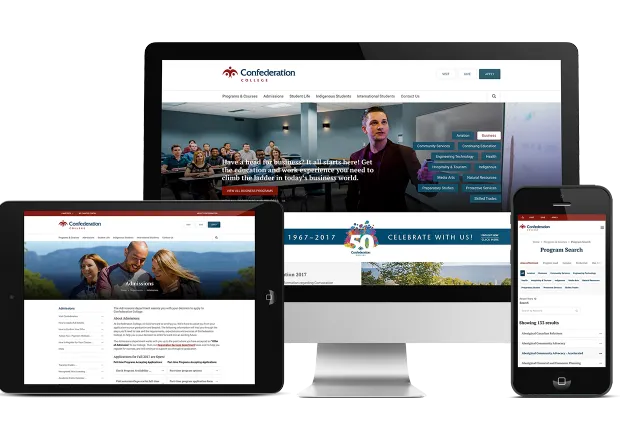
Confederation College’s Department of Advancement and Communications wanted a consistent design and unifying elements across the external facing website and the internal portal components. The visual framework and navigation strategy would need to put recruitment first, providing prospects with the quickest and most targeted information based on user behaviour, while still maintaining access for all other audiences such as alumni, employers, community partners & media.
London Canada Drupal firm Northern partnered with London Canada design agency ResIM for this project. This joint bid brought together a unique combination of extensive post secondary education student recruitment experience and deep development resources and Drupal expertise that's among the best in the country.
The roles of experience planning, information architecture design, concept design (wireframing), prototyping, usability testing, and overall project management were filled by ResIM resources. These resources were augmented by Northern as subcontracted by ResIM, to execute all Drupal theming, technical architecture, development, content governance, accessibility, and training deliverables required by this project.
About the project
The approach to the Confederation project was based on the tenets of Lean UX and moved quickly through immersion, usability testing, and recommendations deliverables before arriving at a functional prototype for further usability testing. The approved prototype was used to form a development plan before the new site would be built on Drupal 7. Quality assurance, training, and launch assistance deliverables were completed immediately following development.
Key project milestones:
- Commencement and Immersion Sessions
- Recommendations Complete
- Prototype Complete
- Development Complete
- Content Migration Complete
- Quality Assurance Complete
- Launch (internal May 18 2015, external May 25 2015)
Outcome
Confederation College now considers the website their number one recruitment tool. The redesigned website advances recruitment efforts through the collection and intelligent use of prospect information (domestic & international) to move them from prospects to applicants to registered students and finally continues to engage them as active alumni.
From an integration perspective the Confederation College project pulls program data from Banner and works with Talisma for CRM functions.
The Program Homepage nodes that content editors edit within Drupal, have a program code field, that acts a foreign key to the Banner Entities stored in the website’s database. When the website loops through the list of programs returned from Banner:
- It takes the program code returned from banner, and checks to see if there is a corresponding Program Homepage node within Drupal, that has the same program code.
- If there is no corresponding Program Homepage node in Drupal, it creates one, and sets the Program code field accordingly. It will be unpublished, because content editors have not yet had a chance to edit its content.
- The website updates it’s Banner entities with the information it gets from Banner.
- If a program no longer shows up in results from Banner, the Program Homepage will be unpublished, if the Program Homepage was created by the Banner integration process. When a user creates a Program Homepage, and then assigns it a Program Code, this can break the functionality that un-publishes a Program Homepage when the program no longer shows up in Banner.
Final Thoughts
The new website supports Confederation College's goal of a decentralized model of content updates. The technology is hosted and managed internally, as was desired. The website is fully responsive and adheres to Web Content Accessibility Guidelines (WCAG 2.0, level A) compliance, as referenced in AODA legislation (province of Ontario, Canada).
Why Drupal was chosen
Confederation College was using an older Drupal platform but were open to changing platforms. The College agreed to update to Drupal 7 and to use Drupal as its new CMS solution after considering the following factors:
- The major advancement of the formal adoption of CKEditor as Drupal’s WYSIWYG editor of choice. The CKEditor module has many useful extension modules such as the CKEditor Link module which allows for links to be added from a list of internal Drupal pages.
- Easy to use administrative tools. The Drupal platform can be configured for both the technical and non-technical users. Drupal also offers great security features, multi-language development and tiered access to the CMS based on user roles and permissions.
- The platform is flexible and easy to extend. Drupal is a framework instead of a platform. The Drupal framework can be used to build both simple and complicated websites and web-based applications. It is not limited by the type of solution you are hoping to build and creates great opportunities for expansion as your needs evolve. It also provides a robust set of APIs for integration with other enterprise systems and content repositories.
- Great online community and resources are available. The online community is always adding, collaborating and active in creating new modules to make the framework better. The online community is open to sharing their ideas and solutions for common roadblocks.
Technical Specifications
Drupal version:
Key modules/theme/distribution used:
Webform. One of the most popular and powerful contributed modules in Drupal is the Webform module: https://www.drupal.org/project/webform This module gives editors the ability to create input forms that can save data to a database and send data via email to administrators. The module is best used for event registrations, surveys, and data collection. The ‘Permissions per Webform' module allows us to apply the Webform permissions (Access webform results, Edit all webform submissions, Delete all webform submissions, Access own webform submissions , etc.) to each individual Webform via the form settings.
Views is one of the most popular contributed modules in the Drupal community and for good reason. It makes creating lists of contents or data tables extremely easy. At heart Views is a SQL query building tool, but it can perform tasks like outputting specifically formatted HTML, pulling in related information and simplifying user interface development. In Views, many types of filters can be added based on field values, publish date, etc. All of these filters can be exposed to the end user so that they can choose the filter value. This is very similar to the concept of search facets where a set of results is filtered down based on selected values or categories.
Workbench allows for multiple customizable states of publishing including “needs review”, “draft” etc. Email notifications can be configured with the rules module that will notify editors of changes in the system. Custom configurations could be developed to create repeatable notifications for various scenarios. Drupal core includes the handling of revision history for all node based content. This functionality combined with the Diff module (https://www.drupal.org/project/diff) will allow the editor the ability to review what has changed on a content revision.
The LDAP project (https://www.drupal.org/project/ldap) allows Drupal to bind to Active Directory to facilitate user validation. Active Directory groups can then be mapped to access groups in Drupal or to editor roles depending on the needs of the College.