Sector(s)
Our client, a leading media house in India, is renowned for its widely circulated English and Hindi daily newspapers, recognized for their impactful journalism and extensive reach.
Key Highlights:
- Crawls various government, and related websites, for job openings
- Scrapes data from these and builds internal Drupal database
- Intranet based application
- Advanced use of Feeds module
- Extensive workflow based on the organizational structure
About the project
The Goal:
The objective of the project was to "scrape" job openings from various Indian Government websites and other websites dedicated to job openings in the government sector in India. The goal was to create a database as a web interface.
The project has been done in Drupal 7
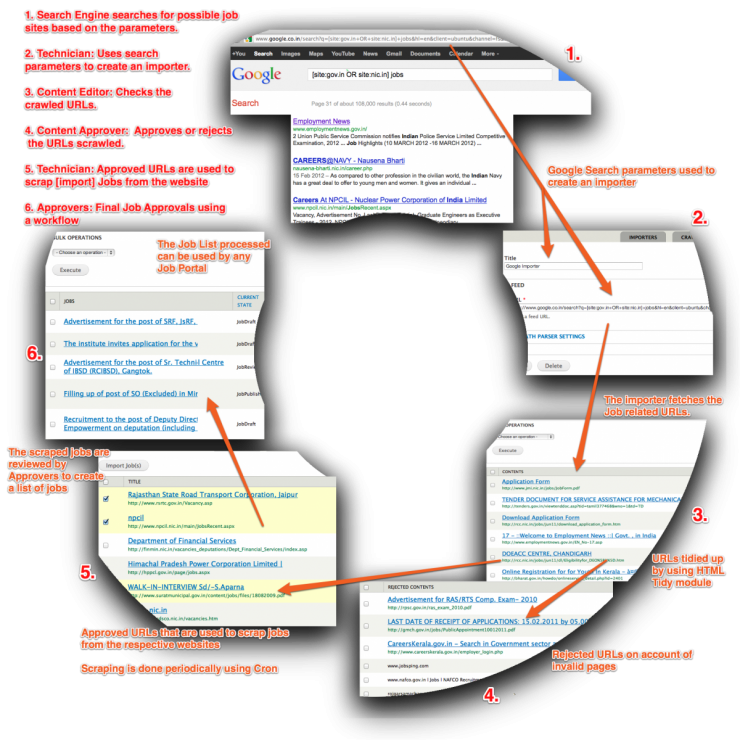
Here is the complete workflow in a nutshell depicting how the whole process worked.
The Challenges:
- The website was in Drupal 7 which meant that while modules worked perfectly fine in Drupal 6, they just didn’t work in D7 or had some bugs due to the architectural changes in D7 core.
- Our team had to write patches for HTML Tidy’s invalid markup and Menu_per_role modules. Getting the patches updated on Drupal.org was a challenge in itself.
- Duplicate entries issue [due to same URLs picked from different crawlers] was resolved by writing custom code. The code essentially checked for the same title and content to check whether the same job was being pulled again.
- Rest of the content checking was done manually by the "Technician" user.
The Outcome:
Our team developed the key features of the website as follows:
Crawler
The application provides list of search engines from where the URLs will be listed. Application specific domains and search keywords can be provided in the form of following sample queries.
Three search engines like Google, Yahoo and Bing have been provided within the application as a default. Other importers can be added if needed.
Scraper
For all approved URL’s after the Crawling has been done, content is scraped by specifying the parsing logic (mapping) by URL tech’s. Scraper then extracts title and body from the pages and maps it to relevant fields in Drupal. It is possible to edit the URL before scraping. Mapping is made available for 15 URL’s in the system.
Workflow
A workbench based workflow is provided to act as a dashboard for various roles on the site.
"Workbench" effectively provides overall improvements for managing content that Drupal does not provide out of the box. Workbench gives us three important solutions :
- a unified and simplified user interface for users who ONLY have to work with content. This decreases training and support time
- the ability to control who has access to edit any content based on an organization's structure not the website structure
- a customizable editorial workflow that integrates with the access control feature described above or works independently on its own
Workbench Moderation is being used to add moderation states apart from the Drupal default of “published” and “unpublished”. Some roles used on the website are as follows [These roles correspond to any media house publishing organization’s roles]:
- Admin - Admin will not be a Drupal super admin hence will have access to limited and hence only required (but all) functionality for the application
- URL Approver - This user can do bulk operations of accepting and rejecting URL’s fetched by the engines
- Technician - With every approved URL, this user will be provided with two options: HTML job importer and XML job importer. User with this role is expected to check each URL and identify which of the two importers will be required.
- Content Reviewer - All scraped job content from the URL’s will be in the draft mode (by default). This content can be reviewed for validity by the Content Reviewer.
- Content Editor - Content Editor will have the flexibility to edit scraped content.
- Tagger - This user can tag published content manually. Information on the job sites can be mapped to form fields. This role was later removed and functionality provided to Content Editor.
Why Drupal was chosen
- The main aim of the MVC architecture was to separate the business logic and application data from the presentation data to the user.
- In general, Drupal could fulfill most of the criteria including backend support, flexible modular architecture, organization boundary support, less time and effort in implementation and customization, easy upgrade, high scalability, and strong community support. The flexible modular architecture of Drupal allowed removing/installing modules at will. This saved resources and improved performance.
- The organization boundary support allows multiple organizations using the same code base which also saves system resources. The result of this evaluation helped them choose Drupal for the migration.

Technical Specifications
Drupal version:
Key modules/theme/distribution used:
There are about 10 important contributed modules that were being used to do assist us in crawling and scraping. A custom module was created for mostly templating and other general purpose uses.
- Feeds - Aggregates RSS/Atom/RDF feeds, imports CSV files and more
- Feeds XPath Parser - Parse an XML or HTML document using XPath
- Job Scheduler - Scheduler API
- Workbench - Workbench Editorial Suite
- Workbench Moderation - Provides content moderation services
- Aggregator - Aggregates syndicated content (RSS, RDF, and Atom feeds)
- Feeds Admin UI - Administrative UI for Feeds module
- Feeds Import - An example of a node importer and a user importer
- Feeds News - A news aggregator built with feeds, creates nodes from imported feed items. With OPML import.
- Rules Scheduler - Add-on to Rules for scheduling the execution of rule components using actions
- Custom module
The Drupal's Feeds module was used because:
Feeds is a pluggable system for importing or aggregating content into Drupal. Out of the box, it supports:
- import or aggregation from RSS feeds, Atom feeds, OPML files or CSV files
- import from an XML, or HTML document using the Feeds XPath Parser
- generation of users, nodes, terms or simple database records
- granular mapping (e. g. map the "author" column of a CSV file to a CCK field or map the title of an RSS feed item to a term name)
- multiple simultaneous configurations organized in "Importers"
- overridable default configuration for the most common use cases
- "Feeds as nodes" paradigm as well as "Standalone" import forms
- aggregation (periodic import) on cron
Feeds module made the crawling and scraping pieces pretty simple. The module, out of the box, allowed the admin to enter URLs from Google/Bing/Yahoo and set mappings for various fields to pull jobs.
Business Benefits:
The project resulted in saving a lot of manual time and effort for our client. Initially all this data was maintained in spreadsheets and hence problems such as data redundancy, manual check of the government portals constantly, updation of spreadsheets existed.
Apart from that, importantly, governance problems were resolved as users were able to access data only that was important/needed by them and could not modify/delete any critical data, even by mistake.