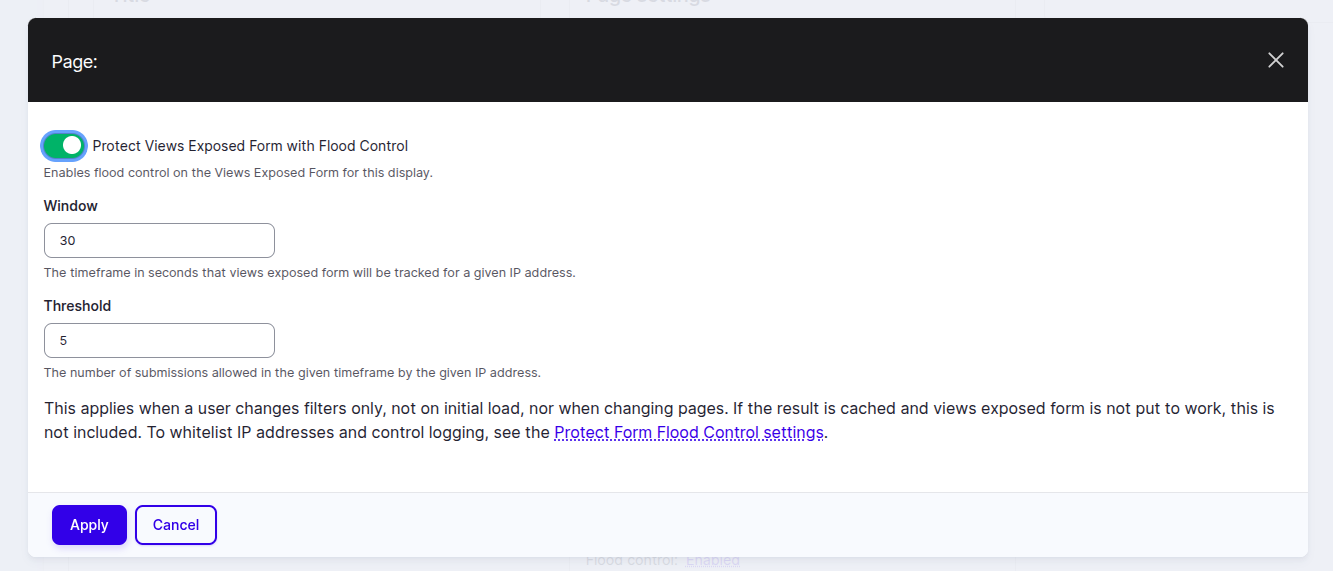
Protect Views Flood Control limits how often visitors can submit Views Exposed Forms. It reduces scraping and abusive traffic by throttling submissions per view/display using Drupal’s Flood API. This module extends the Protect Form Flood Control module.
With the heavy recent increase in new AI scraping bots and their poor ability to navigate forms compared to more established scraping bots like GoogleBot, Views can come under more pressure. These AI Scraping bots often try every combination of every filter effectively attacking your site. Sites running Drupal often provide valuable content that can help LLMs provide better answers by having better training data. We should want the answers provided to end users of LLMs to be higher quality and help provide positive informed answers rather than blocking AI scraping and having LLMs then trained on poorer less informed data. We should also want our content to appear in AI overviews and be used to help LLMs provide better initial answers and encourage end users to come to our sites and read more.
Features
- Per-display throttling: Enable flood control for Views Exposed Forms per View display via a Views Display Extender—site builders choose exactly which View it applies.
- Simple controls: Configure a time Window (seconds) and a Threshold (allowed submissions) for each display. Default settings are maximum 5 exposed form submissions per View checked over a 30 seconds period.
- Bot-friendly signalling: Non-AJAX submissions over the limit return HTTP
429 Too Many RequestswithRetry-After; AJAX submissions show a more user-friendly error on the form itself as a validation error. Note that a 429 response by a true user shows as 'Client error' page with a 429 in the developer console. - IP-based flood: This module uses Drupal core’s Flood system for lightweight, cache-friendly rate limiting. Modules like Ultimate Cron or Simple Cron are recommended to ensure Flood table is cleared frequently.
Post-Installation
- Enable the module as usual.
- Open any View, pick a display (Page, Block), and find the new 'Flood control' section
- Check Enable flood control and set your desired Window and Threshold. Save the View.
- (Optional) Visit the companion settings page for Protect Form Flood Control to manage IP whitelists and logging of blocked attempts.
How it works: On each exposed form submit, the module builds a unique key for that View/display and consults the Flood system. If the threshold within the window is exceeded, it blocks the submit (AJAX: form error; non-AJAX: 429). The limiter only targets exposed filter submits—not initial page loads or pagination.
Additional Requirements
- Drupal core: Views module enabled.
- Protect Form Flood Control: Flood control logging and IP whitelist settings are controlled here.
Suggested Roadmap
- Set up a permission to allow e.g. logged in users to bypass the protection (e.g. site editors)
- ☑
Automated test coverage
Alternative (complementary) approaches
In addition to this module consider:
- Ensuring your content and listings are as cacheable as possible
- Using tools like Cloudflare to rate limit (see intro why we should not just block)
- Using Crawler Rate Limit which is a wider reaching module, not specific to Views and requires more involved setup
- Having bot specific blocking via htaccess
- Using Facet Bot Blocker which provides a range of more advanced tools.
- Or considering further approaches based on this blog post from @smustgrave
Feedback
If this module helped you do let me know e.g. in Drupal Slack (scott_euser) - trying to get a better understanding how this in combination with e.g. Cloudflare helps solve relayed issues, even if anicdotel.