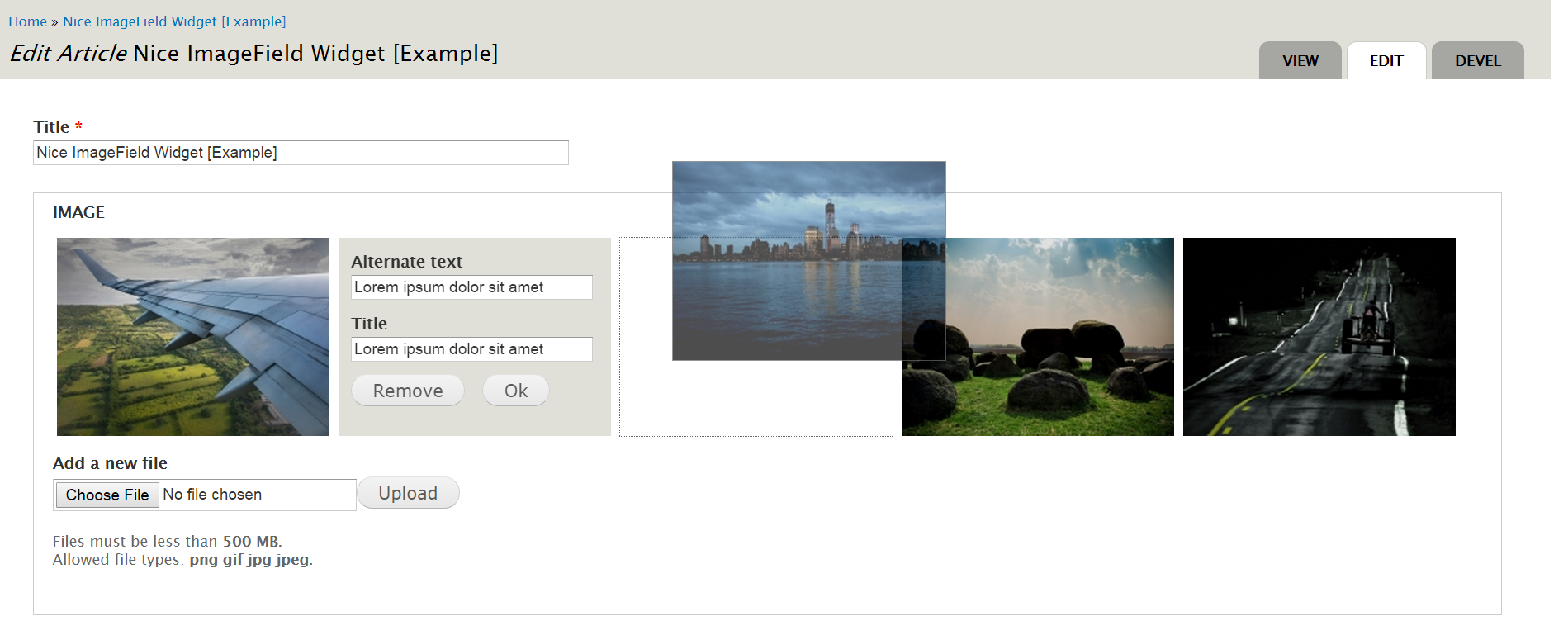
The default Image module allows you to work with a set of images using the tabledrag feature, but it is often uncomfortable.
This module uses the 'sortable' interaction of jQuery UI to overcome this problem and presents a widget called 'Nice Multiple' that can be used with fields of Image Type.
The module allows you to change the order of images in a comfortable interface. You see the image in normal size, and you can change the alternative text and title by clicking on it.
Drupal 9/10
Drupal 9/10 version requires the contrib module jQuery UI Sortable (previously it was a part of core, but was moved to contrib since Drupal 9)
Drupal 7
The Drupal 7 version of the module requires Multiupload Filefield Widget module and allows selecting multiple files to upload at a time.
Requirements
Nice ImageField Widget module has the following dependencies:
Drupal Core Modules
- Image
Contributed Modules (for Drupal 9/10)
Contributed Modules (only for Drupal 7)
- Libraries API
- jQuery Update (jQuery UI: Sortable)
- Multiupload Filefield Widget
External Libraries
- jQuery Flip plugin
Installation
- Install as you would normally install a contributed Drupal module. See Installing modules (Drupal 7) and Installing modules (Drupal 8) documentations for further information.
- Add a Image field to a content type and select the widget 'Nice Multiple'.
- You might have to increase the default
max_input_vars,max_file_uploads,post_max_sizeormax_file_uploadsphp.ini directives.