Welcome to Logo Image Enhanced, a Drupal module designed for beginners and seasoned users alike! If you’re new to Drupal and want your site’s logo to look great, load fast, and be accessible to everyone, this module is for you. It takes Drupal’s basic logo feature and supercharges it—allowing you to easily apply styles, optimize performance, and add accessibility details like alt text, all without needing to be a tech expert. Whether you’re building a personal blog or a business site, this module ensures your logo shines on every device while meeting modern web standards.
Features
What is the basic functionality?
Logo Image Enhanced lets you upload your site’s logo and apply Drupal’s image styles to it—think resizing, compression, or modern formats like WebP. It also adds customizable alt and title text for accessibility.
What unique features does enabling this project add?
- Apply any image style to your logo for a polished look.
- Add custom alt text and title attributes to make your logo screen-reader-friendly.
- Automatically optimize logo size and quality for faster page loads.
- Works with any Drupal theme, no coding required.
When and why would someone use this module?
Use it when you want your logo to stand out, load quickly, or meet accessibility guidelines (like WCAG). It’s perfect if you’re frustrated with Drupal’s default logo limitations or need a consistent look across devices.
What use cases are there?
- A small business wanting a sharp, fast-loading logo on mobile and desktop.
- A nonprofit ensuring their site is accessible to all users.
- A blogger optimizing SEO with proper logo attributes.
Post-Installation
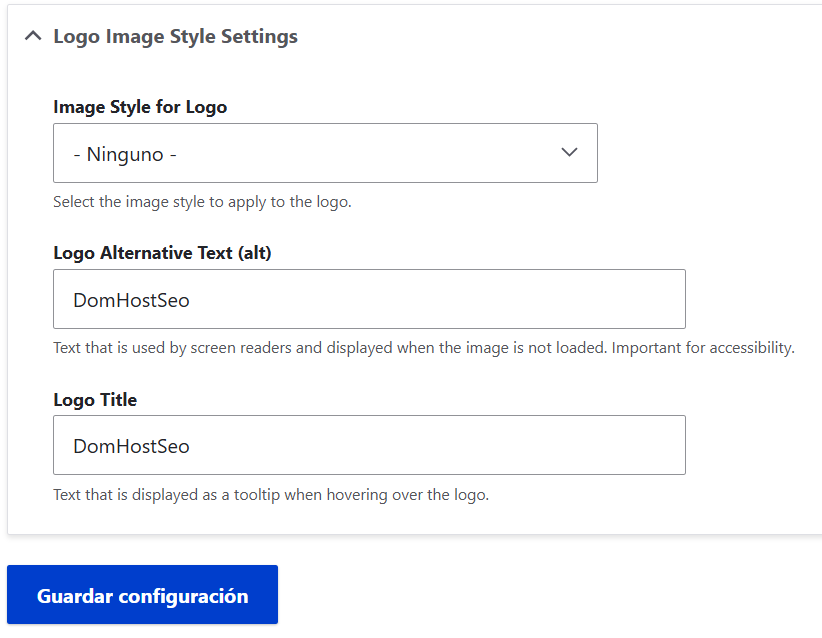
Once installed, Logo Image Enhanced is simple to use! Head to Configuration > System > Site Information (/admin/config/system/site-information) in your Drupal admin panel. You’ll see a new section called "Logo Image Style Settings" below the usual logo upload area. Here’s what to do:
1. Upload your logo as normal.
2. Pick an image style (like “thumbnail” or a custom one you’ve made at Configuration > Media > Image Styles).
3. Add alt text (e.g., “Company Logo”) and a title (e.g., “Visit our homepage”) for accessibility.
4. Save, and your styled, optimized logo will appear site-wide!
No extra steps needed—it auto-detects your theme’s logo. Just upload, configure, and go!
Additional Requirements
To use Logo Image Enhanced, you’ll need:
- Drupal core 10.x or 11.x (the module won’t work on older versions).
- Drupal Image module (don’t worry, it’s included with Drupal core and enabled automatically when you install this module).
That’s it—no external tools or coding required!
Recommended modules/libraries
These optional add-ons can make the module even better:
- Image Effects: Adds fun effects like cropping or filters to your logo styles.
- Image Optimize: Boosts compression for even faster logos.
- WebP: Converts your logo to WebP format for top-notch performance.
Install these from Drupal’s module page if you want extra power!
Similar projects
Other modules like Image Style Logo and Logo Block exist, but here’s how Logo Image Enhanced stands out:
- Image Style Logo: Only works with specific themes and lacks full accessibility options. Our module works with any theme and gives you alt/title control.
- Logo Block: Focuses on where the logo goes, not how it looks. We enhance the logo itself—style, speed, and accessibility.
Plus, we’re fully compatible with Drupal 10 and 11!
Supporting this Module
Love Logo Image Enhanced? Help us keep it awesome:
- Contribute code on our GitHub repository.
- Test it out and report bugs in the issue queue.
- Write a review or share docs to spread the word.
- Tell your Drupal friends about it!
- Check out our sponsor, Dom Host Seo, who made this module possible with their support!
No fancy funding links yet—just community support and our sponsor keep us going.
Community Documentation
Want more help? Check out:
- Detailed configuration guide: Step-by-step setup tips.
- Video tutorial: Watch how to install and use it.
- Best practices: Learn to make your logo accessible and SEO-friendly.
Find these on our project page or community sites like DomHostSeo!
This module is your one-stop solution for a better logo experience in Drupal—easy, powerful, and beginner-friendly. Give it a try!