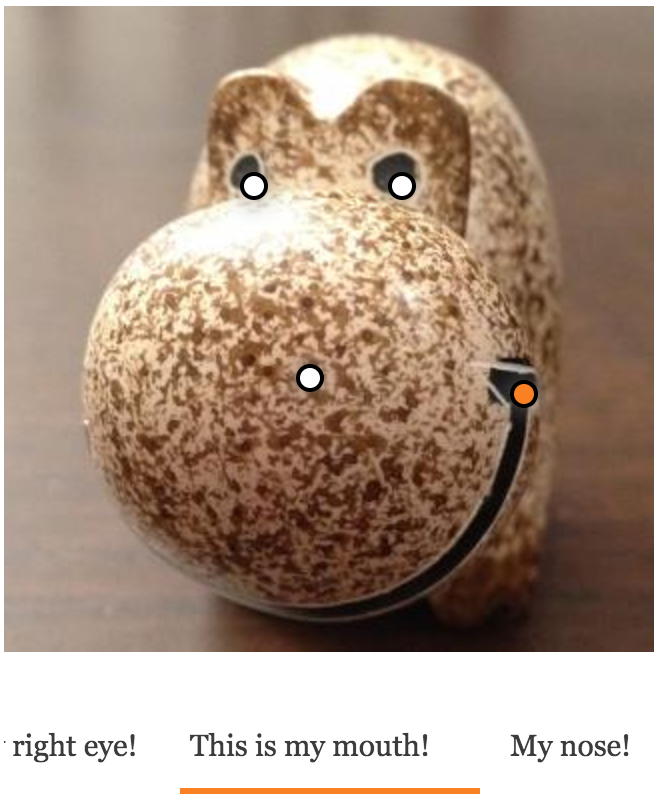
A module for pinning widgets on images
Quick start
- Install this module. Requires JQuery UI Droppable.
- Go to the "Manage display" section of your content type and choose the view mode where you'd like the pins to be displayed.
- This module gives you the option for enabling users to pin widgets for the Image and Responsive image formatter. Enable it as you like.
- Choose a proper image style for dragging the pins around and optionally set a breakpoint for mobile and desktop resolutions.
- Editors now get a link on image fields for pinning widgets on each uploaded image.
- Create your widgets, drag their pins on the image, and save the positions.
- View your content.
Extensible
- Define your own and specific widgets as Drupal plugins.
- You can adjust the frontend behavior to your specific needs with further Javascript extensions. Take a look at the Slick extension to see how you can create your own.
Enhancements
When Slick is installed (https://drupal.org/project/slick), the Imagepin module automatically displays your widgets as a swipable carousel.
Do not use 2.0.x
Do not use 2.0.x branch. This one is not an official one and will not be continued any further. Stick to 8.x-1.0 instead.
Short name
imagepin
Supporting organizations
sponsoring development time