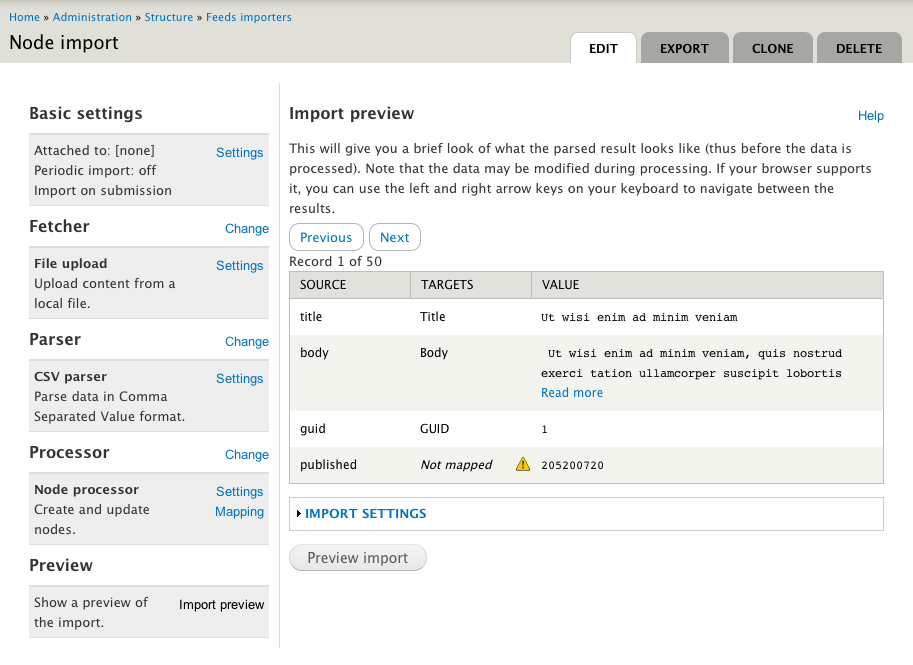
This module extends the Feeds module and provides a way of previewing the source content before importing.
Ever get frustated by debugging your Feeds importers, because you could not get a hang of what's actually in the source? Are you trying to get your config for XPath Parser right? Or do you wonder if your configured Feeds Tampers leads to the desired result?
Meet the Feeds Import Preview module, a module with which you can get a preview of the source before you import the content. As a bonus, it scans your source also for unmapped elements. This is especially handy in case of importing CSV files, where you can quickly see which columns of your CSV file are not mapped yet.
Preview is of parsed result, not end result
Note that the module does not give a preview of the end result, it shows only what the source looks like after parsing. During processing the data will often still be modified, for example an image file will be downloaded: at the end result you will (hopefully) see the image, but during the preview you will only see the URL to the file.
How it works
The importer configuration page gets a new section called "Preview". In there, there is a form that looks almost exactly like the standalone import form provided by Feeds. Put in your source like you would normally do during a real import.
Feeds Import Preview will then fetch and parse your source and then show you the parsed result in a series of tables for the first 50 records. Note that the process step is completely skipped during the preview.
Finally, when you're good with the preview, you can continue to the import form and re-input your source to trigger the real import.
Notes
- You will only get a preview of the parsed result, not the end result. The content to import may still be modified during processing.
- Sources provided at the preview form will not overwrite the sources provided at the import form, and vice versa. This means that if you want to import a source that you just previewed, you need to put it in again at the import form.
- Previewing a source will not trigger an import.
- Only the first 50 records of the source will be shown. This limit may be configurable in the future. Right now, it depends on the "feeds_process_limit" setting.
- You can navigate through the results using the left and right arrow keys on your keyboard (given that your browser supports this).