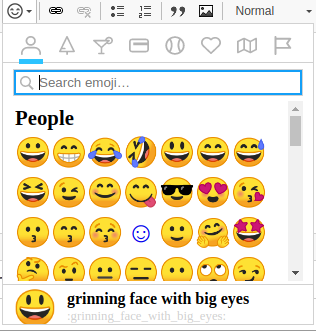
Adds in the Emoji plugin for CKEditor.
This will add a new button on the CKEditor which will enable the emoji feature.
Installation
- Download the plugin from http://ckeditor.com/addon/emoji
- Place the plugin in the root libraries folder (/libraries).
- Enable Emoji module in the Drupal admin.
Composer:
- Copy the following into your project's composer.json file.
- Ensure you have following mapping inside your composer.json.
- Run following command to download required library.
- Enable the Emoji module.
- Configure your WYSIWYG toolbar to include the button.
"repositories": [

  {

    "type": "package",

    "package": {

      "name": "ckeditor-plugin/emoji",

      "version": "4.11.4",

      "type": "drupal-library",

      "dist": {

        "url": "https://download.ckeditor.com/emoji/releases/emoji_4.11.4.zip",

        "type": "zip"

      }

    }

  }

]
"extra": {

  "installer-paths": {

    "web/libraries/{$name}": ["type:drupal-library"]

  }

}
composer require ckeditor-plugin/emoji
The emoji module has the following dependencies:
https://www.drupal.org/project/xml
https://www.drupal.org/project/textwatcher
https://www.drupal.org/project/textmatch
https://www.drupal.org/project/floatpanel
https://www.drupal.org/project/ckeditor_autocomplete
https://www.drupal.org/project/ckeditor_ajax
https://www.drupal.org/project/panelbutton
You can find the installation guide on each module page or in the emoji README.md file.