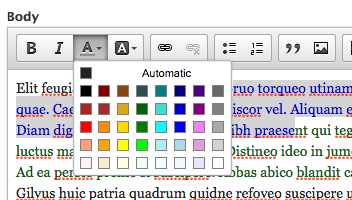
Integrates the CKEditor ColorButton plugin to CKEditor for Drupal 8 and Drupal 9.
Allows users to add color to text or background color behind it. Basic settings are supported for specifying the list of colors that can be allowed in the editor.
This module requires the PanelButton module for CKEditor.
Installation
- Download the plugin from http://ckeditor.com/addon/colorbutton at least version 4.5.6.
- Place the plugin in the root libraries folder (/libraries).
- Enable Color Button module in the Drupal admin.
- Configure your CKEditor toolbar to include the button (either text or background color, or both).
Note: There is a compatibility problem with the latest 4.15.1 versions of the Color Button and Panel Button libraries. See [#3183012] for more information.
Note: Both buttons are using inline CSS styles to style the content, so they will work only in text formats where HTML Filter ("Limit allowed HTML tags") is not enabled. See [#3182292] and [#3109650] for more information.
You can enter a list of hex values to support to limit the user on what colors they can use. Leave blank to use the default values from the plugin.