The SLS web team, working with Webdrips, migrated a database-driven proprietary content management system to Drupal. This provided a significantly improved content management experience while preserving the look and feel of the site.
About the project
Goals
The primary goal of this project was to migrate law.stanford.edu from a legacy CMS to Drupal. Migration was comprised of two parts:
- Conversion of a set of complex layouts and proprietary PHP code into a Drupal-based site that uses modules (mostly contributed and custom where needed) and a custom theme.
- Migration of approximately 10,000 pages stored in the database, and around 5000 HTML or text-based pages.
The look of the site was to be preserved, so no graphical design changes were made. The secondary goal was to make improvements where possible. The timeline for the project, given the limited resources, was 12 to 18 months. Also, with more than 300,000 page views and 80,000 unique visitors per month, we wanted to be sure the performance wasn't diminished.
Requirements
The primary requirements of the site were as follows:
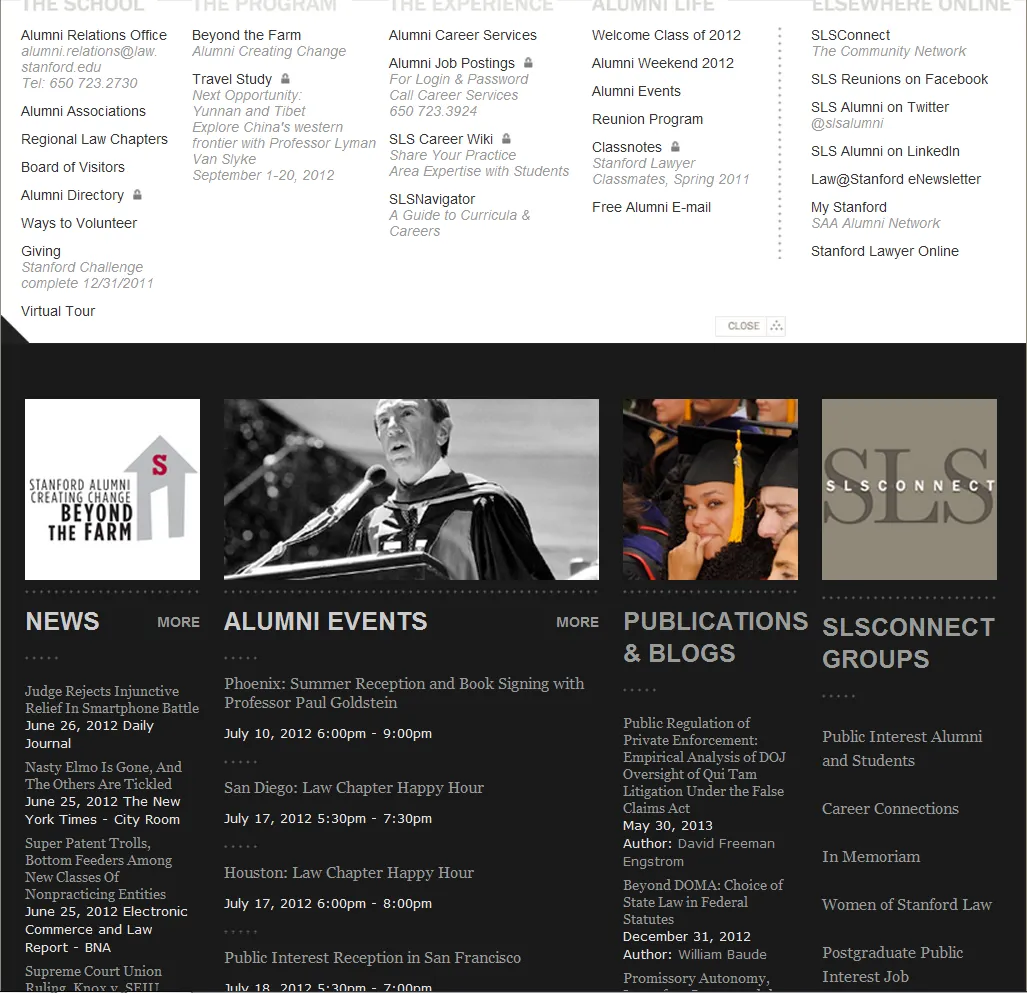
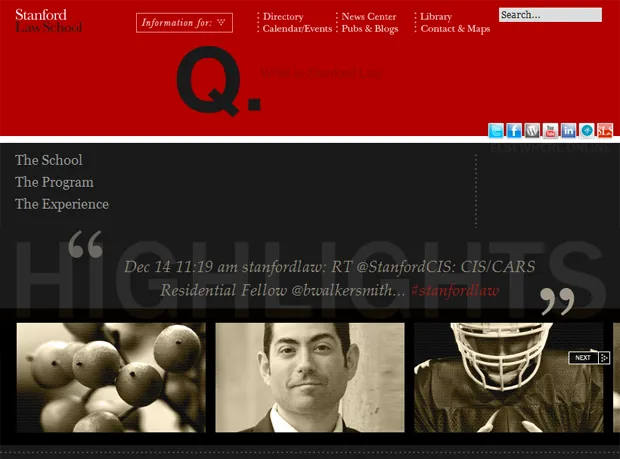
- Five information portals (see the first screenshot, below): provide a Mega Menu with links for the portal audience (e.g. alumni), and news, events, publications, and user groups related to the portal.
- Areas of Interest sections that display all information related to a particular area of law.
- Person and department directory: a filterable, sorted list of all people and departments associated with SLS.
- Events section: a searchable, filterable list of events and mini calendar filterable by event type, audience, etc.
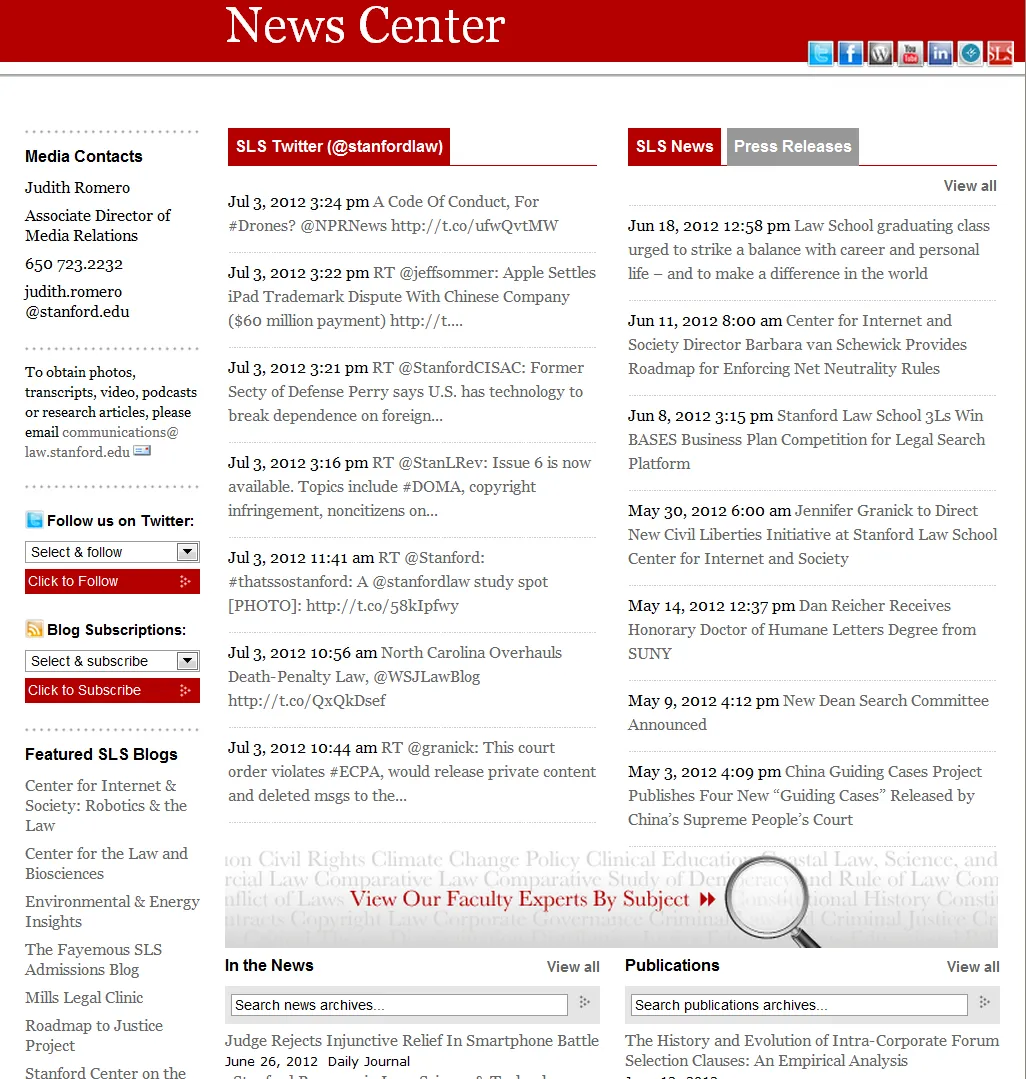
- News Center (see the second screenshot, below): a hub for displaying latest tweets, news, press releases, and publications. The page is also a launching point to all of the school's tweeters and bloggers.
- Publications Section: searchable, complete bibliography of all publications by SLS faculty and staff.
- Organizational pages for research centers, programs, student organizations and departments.
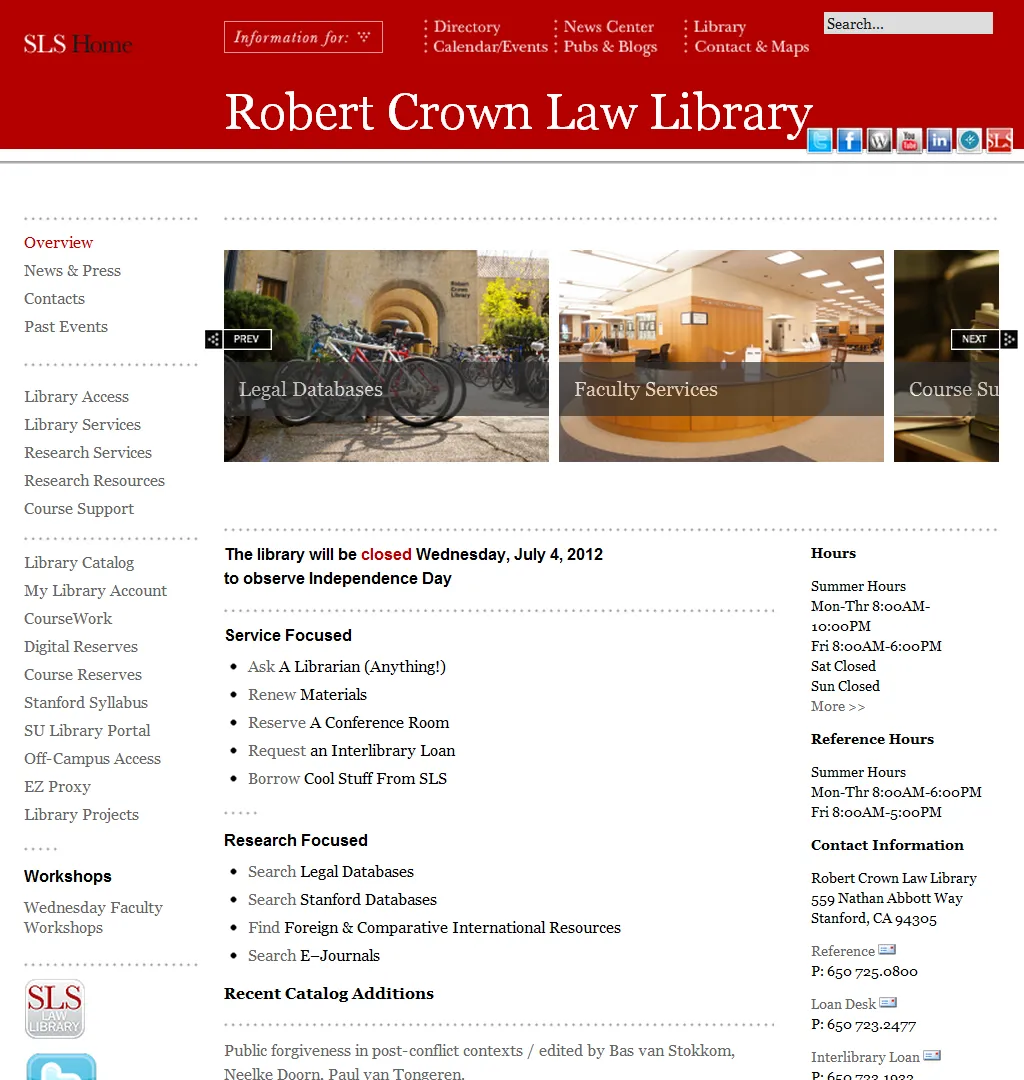
- Library section (see the final screenshot, below): a collection of pages, news, events, and other information related to the Robert Crown Law Library.
- Static pages for general information about the school, admissions, and other topics, with several levels of child pages.
- Complex breadcrumbs: the breadcrumb navigation is used on pages within the site buried several levels deep, and the algorithm for how they're generated became so complex, it wound up requiring more than 100 lines of code.
- Events submission and approval workflow (configured by SLS web team).
- Additional specialized pages for case studies, fellowship information, etc.
Primary Content (Page) Types
- Areas of Interest: SLS showcases six areas of interest. Each area of interest includes a primary description, links to more detailed description by subject within an image carousel, an automated menu with links to related listing pages for faculty, news, departments, publications, events, and other related information. The primary challenge for this page type was in building the automated menu such that the links to related listing pages were only displayed if the listing page had at least one valid item. For example, we only wanted to show the "News" link if at least one news page had been associated to that area of interest with the proper tag.
- Child page: several content types, including areas of interest, needed to have the idea of a page hierarchy. Child pages of any depth needed the option of inheriting a parent's page title, banner, and left/right sidebar content. This feature was provided so content managers could edit information in one place. Child pages also needed to be optionally inserted into an automated context navigation menu. The primary challenge with child pages was providing the optional inheritance of one or more parent assets.
- Courses: include basic information such as title and description, tagging, related person who taught the course, and the departments the course was related to. Course content is imported from a university-wide Stanford site using an XML feed (developed by Stanford ITS).
- Events: the most complex page type featured common fields such as title, description, from/to dates, location, related department, and several fields to help the facilities department decide on the best location. Events also included a workflow described in the Modules/Themes section below.
- Landing page: a page type used as a root page for each of 18 sections on the site (eg. School, Courses, Giving to SLS, etc.). These pages include title, banner, right/left sidebar content, related person quote, and the ability to insert automated content using a view. Providing content managers the capability to insert a view was somewhat challenging in that we needed to generate a list of views, their associated displays, and any optional arguments. This involved writing some custom code because no existing Drupal module provided this capability.
- News, publications, and press releases: media page types included basic information such as title, author, date, source, article link, related faculty, and related organization.
- Organizations: this page type allowed for creation of office, department, program, and clinic pages. Organizations included location/contact information, left/right sidebar content, relationships to other organizations, and other information. Organizations presented two primary challenges: 1) if the content manager chose a particular taxonomy term, the layout needed to be altered to accommodate an image carousel (which was accomplished with the Panels module (see below); 2) If the organization had the proper flag set and at least one news, publication, or press release page related to the organization existed, SLS wanted to display the news/press release/publication in place of the organization's description as the landing page for the organization. In Drupal terms, this implies displaying either the node or a view when the path of the node was accessed.
- Person: a page type for adding faculty, staff, and other people to SLS. Person included name, contact information, photo, CV (résumé) file, biography, awards/honors, education, areas of expertise, and website links and, most complex part, one or multiple roles at SLS.
Outcome
The project is a major upgrade over the previous CMS for both content creators and administrators. This site now provides a path to the future that will scale with SLS needs.
One of the biggest challenges was working with the team from several groups, including the Office of Communications, Office of IT, and the testing team. Drupal came to the rescue once again with the Open Atrium project-in-a-box website. If you've never played with Open Atrium before, consider giving it a try. In about four hours, we had a basic project collaboration tool in place. It provides bug tracking by project, a notebook for documentation, a calendar for project events, and a wonderful dashboard to bring it all together.
Why Drupal was chosen
Stanford Law School (SLS) wanted to migrate law.stanford.edu from a custom, unsupported, outdated, unwieldy, proprietary legacy CMS to an open-source, scalable, extendable, robust CMS that would meet SLS web needs now and in the future.
The Drupal CMS was selected for the following reasons:
- Drupal is a scalable and extendable CMS with wide variety of modules that enable a developer to build a system that can meet current site requirements and easily add new functionality in the future.
- Advanced system of Roles and Permissions makes Drupal a perfect platform to securely distribute content management to departments, students, and other stakeholders.
- Drupal has great community support and has become the de facto standard at Stanford.
Technical Specifications
Key modules/theme/distribution used:
The primary modules deserving special mention include the following:
Views UI, Views API
While no site is complete without Views, we were able to put together some interesting scenarios, including the following:
- Automated menu where each menu item is a view, and we used the Views API to determine if a set of view displays had results. Each view display with at least one result resulted in a menu item being generated for the related display.
- "Query altering" to get the correct argument set in the view. Sometimes there's no way around using node titles as a Views argument, but titles can contain just about any text, including punctuation that breaks Views arguments (because it's automatically removed by Pathauto and not desirable in the path in any case). With a little Views query altering magic (
hook_views_query_alter()), it's relatively simple to load the correct node title and use it as an argument. - Custom theme output using over 80 Views template files. The way Views breaks down its theming typically makes overriding output relatively simple and straightforward.
Note: We believe development could have been sped up somewhat if we had put together a Views row plugin. Also, when this project gets migrated to Drupal 7, we believe we could make significant use of entity theming to reduce the overall theming needed.
CCK, CCK API
CCK is another must-have module without a doubt, but we really found some "hidden" API gems that saved a ton of time. For example the $field_[your_field/group_name]_rendered object contains the complete markup for the related field or group. This allows for printing the rendered output for the field or group only under certain conditions.
Also the CCK theme override functions, such as theme_content_view_multiple_field() were life savers, since they allowed us to display CCK fields exactly as the school desired.
Node Hierarchy
Aside from Views and CCK, this module was probably the third most useful. It allows for any page type to have child pages; provides some handy menus, Views, and Pathauto integration; and includes an API robust enough to create more complex relationships and even set hierarchy during migration using the Migrate module. The school was able to use these features to create some complex sections with multiple levels of hierarchy.
Migrate/Migrate Extras
These modules (plus some dependent modules) were required to migrate the content from the legacy MySQL database to the Drupal MySQL database. Of all the modules used, these modules were by far the most extensible by being built from the ground up using object oriented programming (OOP). This extensibility made what would have been an absolute nightmare into a reasonably straightforward coding task.
Now throw in Drush integration, the ability to update existing content, and the ability to simply roll back and re-import content, and you have a wonderful user experience on top of a very powerful import tool. If you have a complex migration that can't be handled with the Feeds module, look no further.
Other Modules
- Devel: with thousands of lines of PHP added during development, this module was a godsend for navigating through complex objects and aiding in debugging.
- Workflow/Rules: the school had a requirement that faculty and students be able to create events. Student events needed to be approved by Student Affairs, and all in-house events needed approval from Facilities. The Workflow and Rules module were used to set up all the required event flows, send emails, and keep all the event stakeholders happy.
- Panels: while Zen provided a nice one, two, or three column layout, and Views theming allowed for others, there were a few places where layout variations required the use of Panels to keep content/layout manageable. Panels also allowed us to use a taxonomy tag to determine page layout, which turned out to be a very nice addition for their content managers.
Zen Theme
We built a sub-theme based on the Zen theme because, at the time, it had the best accessibility rating, and it comes with a plethora of incredibly well-documented theme override functions that came in very handy during development. For example, we made use of the zen_body_attributes() function to automatically set the page background color based on page type and other conditions.
Special Thanks
Webdrips would like to thank each and every person and organization involved in crafting the modules listed above, with a special huge thanks to Mike Ryan for all his help with the Migrate module. Without the Migrate module, I simply don't know how we would have completed the legacy CMS to Drupal database migration.