Sector(s)
Team Members
Single Sign On for Headless Drupal System
Setting up a Headless Drupal environment gives you a lot of flexibility, scalability and the opportunity to have your content be free from any back end shackles. And on top of that, If you can add another layer of security, case in point, enable Single Sign On Feature on your Headless Website, it would be a secure, robust and overall impressive website with a great user experience.
We, at miniOrange, have developed a Single Sign On (SSO) solution for your Headless Drupal environment. We had 2 Drupal websites, both of which were Decoupled Drupal Websites. One of the websites was to act as a Service Provider and the other as an Identity Provider.
Components Involved:
In this use case, we have 2 Headless Drupal websites, one acting as the Service Provider, and the other as the Identity Provider. The Front End, was created using ReactJS.
-
Decoupled Service Provider (SP)
- SP Backend: Drupal 9.x
- SP Front End: ReactJS Application
-
Decoupled Identity Provider (IdP)
- IDP Backend: Drupal 9.x
- IDP Frontend: ReactJS Application
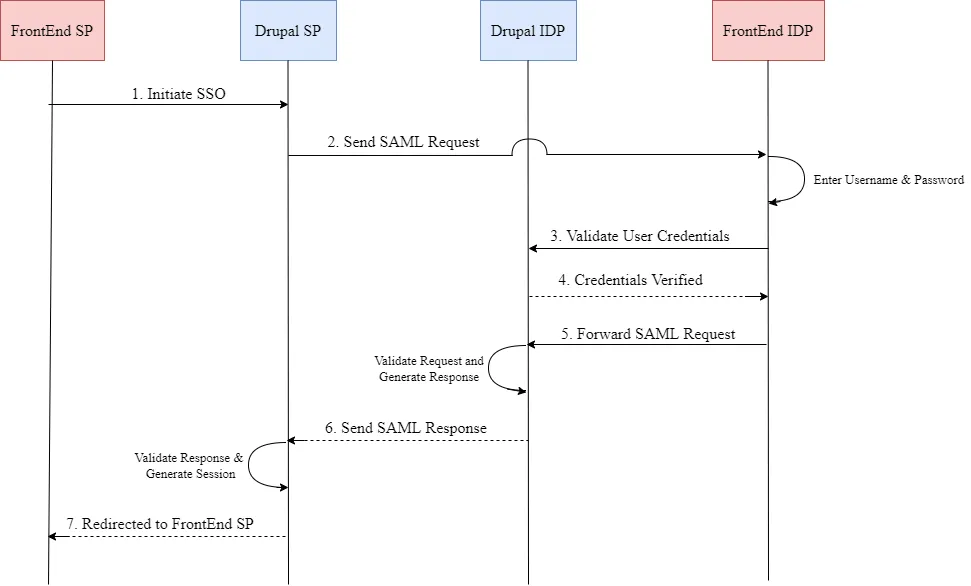
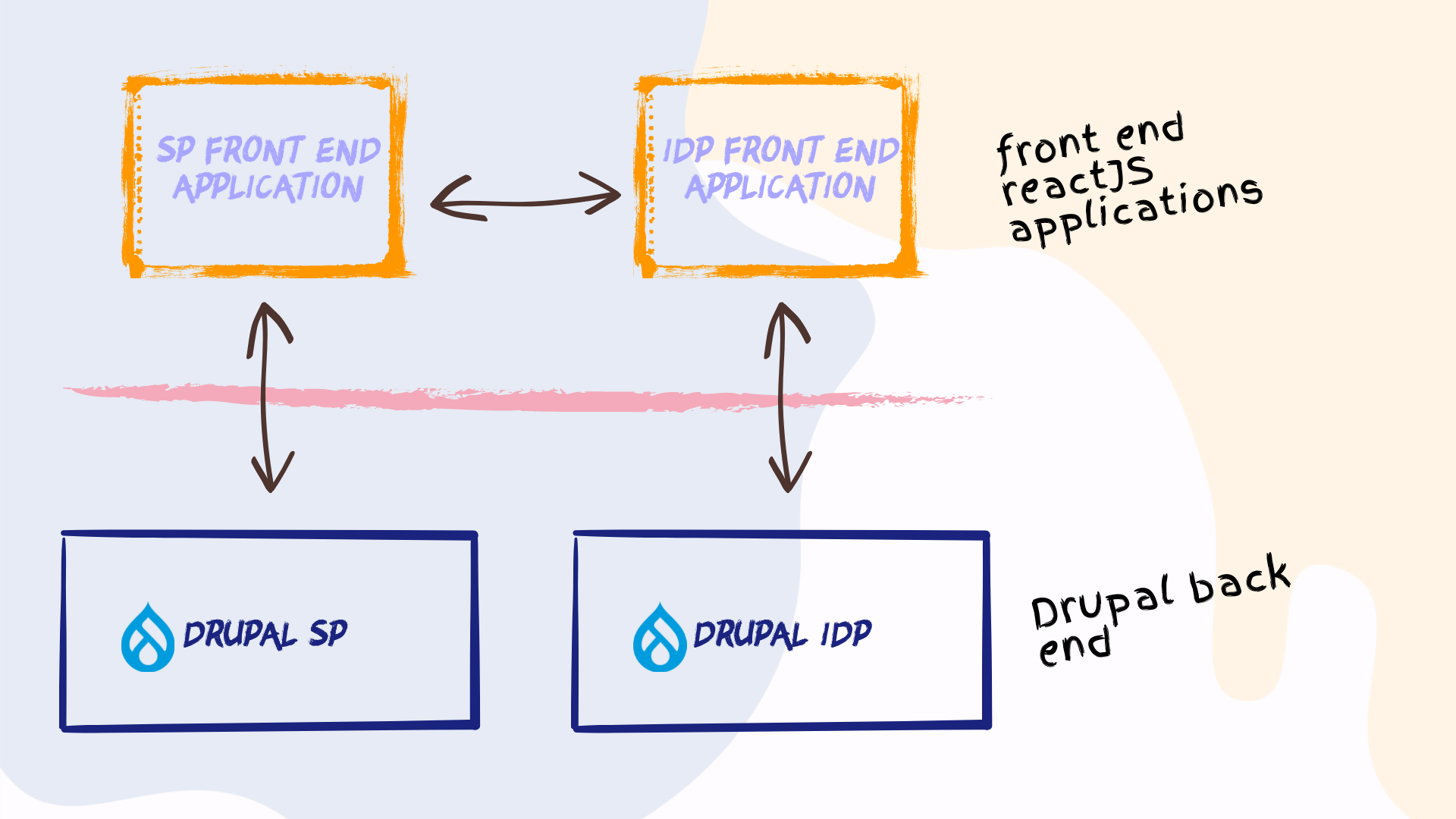 Fig 1. Headless Drupal SSO
Modules Used:
Overview:
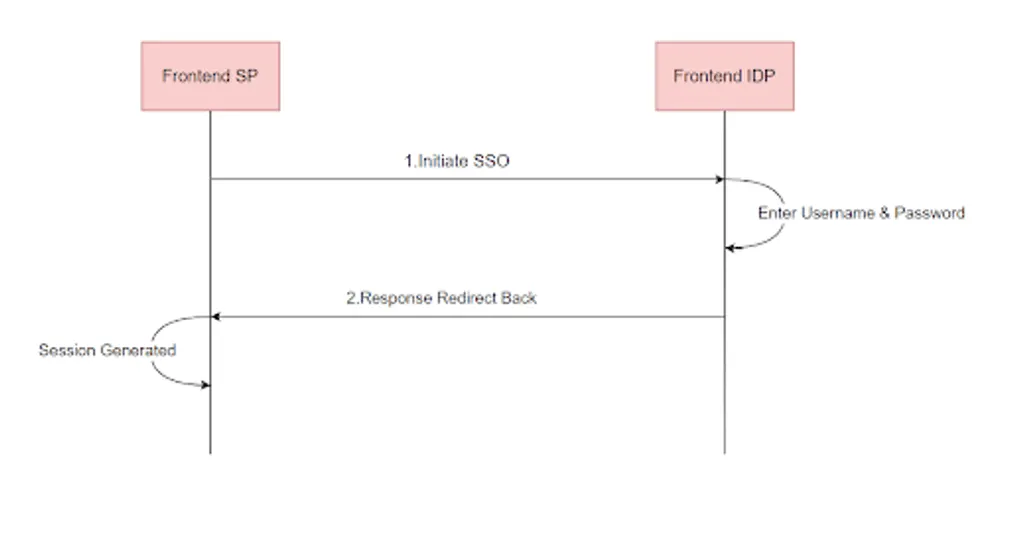
The system is split into 4 pieces, 2 of which are directly visible to the end user. ReactJS is used to build front end applications - SP Front End as well as IDP Front End. The user would start the login process from the Front End page, and be redirected to the Back End page, upon which he/she inputs the IdP credentials. After successful authentication, he is logged into the Front End as well as Back End.
Detailed Flow:
Now, let’s look into the black box of the system. The designed system, has 2 primary components
- Headless Drupal SP System with its own ReactJS based front end.
- And a similar Headless Drupal IdP System with its own ReactJS based front end.
Stage 1: Login
The Login Process starts in the ReactJS application of the Service Provider. The user, who is trying to log in, would see a Login URL on the ReactJS application. Upon clicking on the URL in question, a SAML request is generated on the Drupal SP back end and is sent to the ReactJS Front End of the Drupal IDP.
Stage 2: User Authentication
When the SAML request is received at the IDP Front end, the User is met with the actual Login Page, wherein he/she would punch in his IDP Credentials.
The input credentials are verified with the IDP User Database, i.e. on the Drupal backend.
Now, there arise 2 possibilities.
2.1 Credentials Verified
If the credentials are successfully verified, then the session is created on the IDP backend of the Headless Drupal System.
2.2 Credentials Verification Failed
If the input credentials fail the verification, then a message is shown to the user and the user is prompted to input the correct credentials. And repeat the verification check.
After successful verification, a success message is sent back to the ReactJS Front End.
Stage 3: SAML Request Processing
Upon successful verification of the user credentials, the IDP Front End ReactJS application, sends the SAML request, received in Stage 1, to the Headless Drupal IDP Back End. Thereafter, after the receipt of the SAML Request, a session is created for the user on the Back End Drupal System.
The IDP then generates the SAML Response, which comprises the received Request, as well as the configured User Information fields as per the Role and Attribute Mapping settings. This response is sent against the received SAML Request.
Stage 4: SAML Response Processing
The SAML Response, generated by the Headless Drupal Back End (IDP), is then sent to the SP Back End. The SP Back End then processes the SAML response. The user information is checked against the database, if the user exists i.e. registered user, then the session is created for him.
On the other hand, if the user does not exist i.e. unregistered user, then the user is created as per the registered configuration.
After processing the SAML Response, the control is redirected to the ReactJS SP Front End.
To know more about our Single Sign On solutions, you can check out this link.
Why Drupal was chosen
Having a Headless or Decoupled Drupal system, gives the developers complete control over the front end - UI and UX elements, as well as the backend. In a Headless Drupal System, the Drupal system serves as the backend content repository, while the frontend is developed using various technologies such as ReactJS. Having a Headless system has many benefits including but not limited to
- Content can be pushed to a variety of displays/output devices without being shackled to a browser window.
- Having the freedom of designing your own UI using technologies like ReactJS frees you from using generic themes.
- Redesigning and Revamping your website to better serve the rising needs of the consumers can be easily handled due to the decoupled nature of the website.
- The page loading speed is greatly improved, subject to proper ReactJS design and development
- You will get a more secure website as headless systems are a smaller target, because of fewer open connections to servers and databases.
Technical Specifications
Drupal version:
Key modules/theme/distribution used: