Sector(s)
Team Members
Project Team
Full internal team included:
- Joshua Charles
- Daniel Stoll
- Vanessa Roman
- Jessica Jernigan
Founded in 1929, Rutgers Business School is one of the premier business schools in the United States. We offer business education for graduates, undergraduates, and executives across a variety of subjects including finance, accounting, marketing, supply chain management, pharmaceutical management, business of fashion, entrepreneurship, and more. Our degree and non-degree programs are highly ranked and are featured in publications such as U.S. News & World Report, Financial Times, Bloomberg Businessweek, Poets & Quants, Ivy Exec, Gartner, Military Times, and more. With over 9,000 students, 400 faculty, 200 staff, and 43,000 alumni, our website serves as a marketing and communications platform to attract new students and promote Rutgers Business School.
About the project
Goals
From a broad perspective, the primary objective of our new site was to attract new students and drive enrollments for our academic programs. Our secondary objectives included having the ability to promote our faculty, research, student success, and social impact.
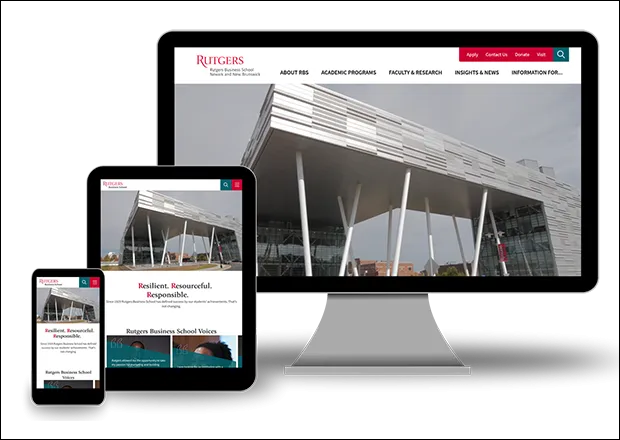
For design-specific goals, the most important goal was to make a mobile-first, responsive design. A second goal was to make sure our site met WCAG 2.0 accessibility standards. A third goal was brand unification between our site and our marketing materials. A fourth goal was to make our design visually engaging by incorporating more and larger photos, video (including ambient), as well as motion in general (such as subtle changes to design elements when users interacted with the page via mouse, keyboard, or touch). A fifth goal was to re-organize our information architecture and navigation (which spiraled out-of-control after years of adding new and different types of content).
Because we were already familiar with Drupal 6, we knew we were getting a good foundation to work with. For technology-specific goals, we simply wanted to continue using an admin panel that made it as simple as possible for content editors and site admins to create new content and manage the site. Any new features and improvements to these areas was an added bonus. Another technology goal was to ensure our codebase was organized in a way that made it easy for our internal team to maintain over time.
For content, our primary goal was to remove all current student, faculty, and staff content from our main site and move that to a separate, internal site. This allowed us to use the main site to focus on external audiences. A second content goal was to drastically reduce the number of individual pages we had. Some pages included only a few lines of text. We wanted to consolidate, where it made sense, similar content into single pages. The hope was this would make our pages more authoritative to search engines and useful to users who don't need to click around as much.
While all of these are soft goals, we also had hard goals such as increasing overall web traffic, increasing RSVPs to admissions events, and increasing inquiries to our programs. For these goals however, we did not set specific percentage targets to reach or specific end dates due to how drastically different the two sites would be.
Requirements
- In terms of specific requirements, we needed to:
- Connect our site to Google Tag Manager (and by extension Google Analytics)
- Connect our webforms to CRM platforms (Pardot and Salesforce)
- Integrate Wistia & YouTube videos into content
- Include a Program Finder for our Executive Education programs
- Feature a searchable and filterable faculty directory
- Sharing news articles to social media
Outcomes
With our new Drupal 8 site, we accomplished our content, design, and technology goals (i.e., soft goals). Our information architecture is much simpler, our design is unified with the brand, our analytics and CRM platforms are integrated and functioning properly, our codebase is well organized, and our overall user-experience has improved, amongst many other positives. In terms of content, our site is now organized around clearly defined user personas (prospective students, journalists, alumni, recruiters, and industry) who directly contribute towards our primary and secondary objectives. (Our previous site's content was organized around internal department structures which were not intuitive to external audiences.)
For our hard goals, our total unique pageviews and sessions are down slightly, but that was to be expected considering we removed more than half of our old pages. We also moved internal content for students, faculty, and staff to another site. Our inquiries and RSVPs for admissions events are up however, which is due in part to improved design and greater visibility of our CTAs. Having restructured our information architecture, we're on the right track and well-positioned to move forward.
Why Drupal was chosen
We chose Drupal 8 because its open source nature provided us with a measure of confidence in its security, reliability, and transparency. Flexibility was also important to our developers because we know we wanted to iterate on the design and functionality over time instead of waiting another 5-6 years. Ease-of-use for our site admins and content editors was also a high priority.
Drupal 8 checked all of those boxes.
Additional benefits of Drupal 8 included familiarity with the platform (our old site used Drupal 6), a de-coupled option (for future integration with new interfaces), and removing the need to re-platform with our next major redesign.
Technical Specifications
Drupal version:
Key modules/theme/distribution used:
It's worth noting many of the most critical modules are already included in Drupal Core. Modules like Breakpoint, CKeditor, Responsive Image, Taxonomy, Views, and more make life simple for our content editors, site builders, and front-end developers.
We display content in a multitude of ways so we rely heavily on Display Suite and Field Group to help structure and display the different variations of our content types and paragraphs.
We first fell in love with the simplicity of IMCE on Drupal 6 and carried it over to Drupal 8. It makes managing and retrieving files easier for our content editors.
On our previous site, we developed a bad habit of entering full page URLs as links in our WYSIWYG editor. Over time, this made content management difficult when page URLs changed or when we clicked links while using dev environments (which would kick us back out to production). Installing Linkit and enforcing a proper workflow for using it makes it significantly easier to manage links across our site.
Paragraphs is one of our most critical modules. We use paragraphs to form the bulk of our content and it allows us to select from different content objects/design pieces to build each page with. A few examples of paragraphs we created are Hero (displays page title with or without a hero image), News Row of 4 (displays 4 most recent or specific news articles), Webform (displays any webform), and WYSIWYG (our default for displaying paragraphs of text).
We use Rabbit Hole to hide content used for supplemental purposes. For example, we have a content type called Classes which is only used to store schedule details for each of our certificate programs. The Class nodes themselves don't need to be accessed directly by the user. Upcoming class details are instead displayed through views on program landing pages.
As part of our site redesign, we removed more than half of our old pages and changed the URL patterns for most of our remaining content. Redirect allows us to redirect users who visit the old URLs to the appropriate pages on the new site.
Search API allows us to index all rendered text that appeared on a page, regardless of how the page was constructed on the back-end.
Social Media Share allows users to share our news articles on social media. This helps extend the visibility of our stories and drive traffic back to our website.
Webform allows us to easily manage user-submitted data, which is especially helpful for users registering for admissions events and signing up for email newsletters. Webform has a ton of features but one that's invaluable to us are handlers. When prospective students register for an admissions event for example, the webform handler passes select data into our CRM which we can then use for further engagement.