Sector(s)
Team Members
Women for Women International is one of the largest global communities that invests in women survivors of war and conflict. They have used an integrated approach to go beyond charity to innovation: They are a learning organization that listens to data, their teams on-the-ground, and women themselves.
In 2021, Women For Women (WFW) and miniOrange partnered to devise an innovative solution for a few of the critical security requirements WFW had. The multiple requirements had to be worked out such that no two solutions conflict. To up the ante, Drupal developers at miniOrange were required to come up with an early and reasonable solution in order to deliver passwordless login functionality and establish an SSO between two independent Drupal sites, one of which we did not have access to. Aggravating it further, the Drupal site had a pre-installed module, Salesforce Suite, which we had to retain the functionality of. It was our job to knit these requirements together in the Drupal sites and make them infallible and dependable.
About the project
Key Challenges -
-
Passwordless login was one of the most critical challenges. There is no password involved in the whole solution. Both the Drupal sites and Salesforce are passwordless in their truest sense.
-
IDP initiated SSO was required by the organization, but the secondary - Inaccessible - site (Let’s call it Site B for convenience) only supported OAuth SSO Protocol. There is absolutely nothing that can be altered at Site B and OAuth doesn’t support IdP initiated SSO.
-
The users at the primary site (Site A) have to be in sync with the Salesforce already connected to it. The 2FA module required to be configured in order to establish passwordless login needs to consider multiple edge cases in order to function properly.
Overview:
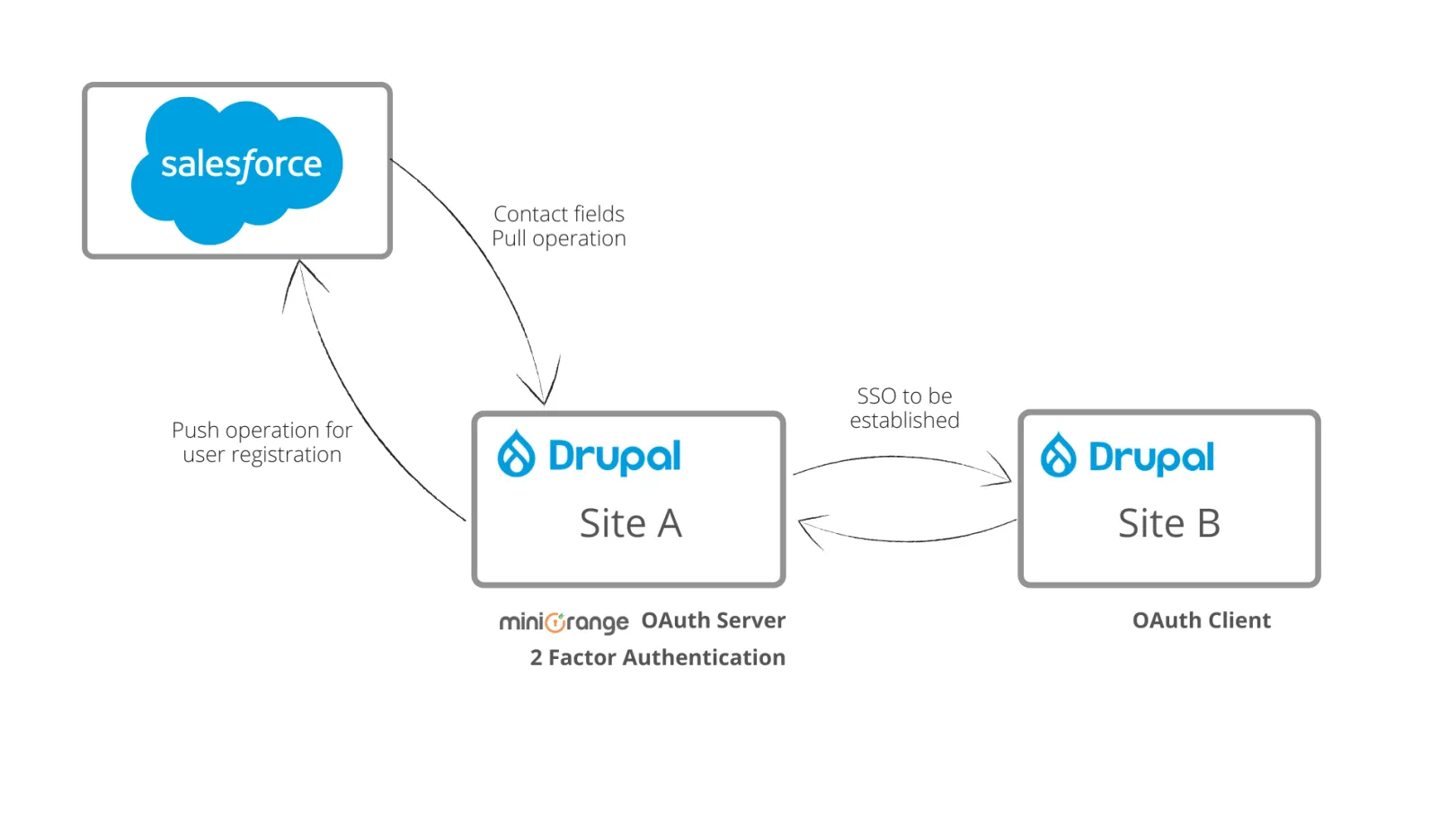
For simplicity, let’s first understand the basic structure of the sites under consideration. The two Drupal sites would be referred to as Site A and Site B throughout this document for convenience.
Site A is pre-configured with the Salesforce Suite module. Salesforce Suite module is responsible for keeping the Drupal site and the Salesforce contact fields in synchronization. It performs the pull and push operations of the contacts/users between Site A and Salesforce.
IDP Initiated Single Sign-On has to be established between Site A and Site B such that when a session is created on Site A, the user can access Site B - be redirected to Site B - at just a click of a Button on the Site A dashboard.
Pre-existing Salesforce suite modules should stay in place, and the customization of the 2FA module to get desired functionality is done taking that into account. The Salesforce suite module is utilized in the solution for the following functionality -
-
The pull operation is performed in order to update newly added users and make them available to the Drupal site.
-
Push Operation - When the user registers to the Drupal site directly through registration link, then the user contact is created (or pushed) on the fly, at the Salesforce.
-
The contact fields pull and push operations from and to the Salesforce are handled by the Salesforce Mapping component of the Salesforce Suite Module
Application:
The Modules used to achieve the Functionality:
Addressing the challenges in their order, the first one in focus is “Establishing an IDP initiated SSO between Site A and Site B”.
OAuth doesn’t support IdP initiated SSO, and therefore miniOrange OAuth Server Module at Site A was configured with OpenID Connect Module at Site B to establish SSO between the two.
miniOrange OAuth Server Module provides the SSO functionality, which enables users to login into Site B if the user session exists in Site A.
The next issue at hand is to configure a Passwordless login setup such that when the user trying to log in, if a valid one, receives an OTP over the registered Phone Number as well as Email. The solution devised to fulfil this requirement was to configure a two-factor authentication module at Site A.
In order to ensure that the solution being offered isn't just ubiquitous, expert Drupal developers at miniOrange ensured that the solution being implemented is adequately versatile to adapt to any and all edge cases.
The following three scenarios would thoroughly explain how the arrangement is going to function in different circumstances.
- When the user is present on Site A
In this case, the user’s contact field data is already available in the Drupal Database of Site A. The user would attempt a login by feeding in their username/phone number.
If the user is found in the database of Site A, the 2FA is invoked. (If a 2FA method is configured then the user is asked to validate by submitting the OTP received on their contact number, else inline 2FA registration flow is invoked to configure the OTP on SMS or email 2FA method). After successful validation, the user gets logged in to Site A.
In order to get the user to log in to Site B, the SSO URL received from Site B is affixed onto a button on the dashboard of Site A. Whenever the user would click on the link, they would be smoothly redirected to Site B and a session would be created automatically for the user.
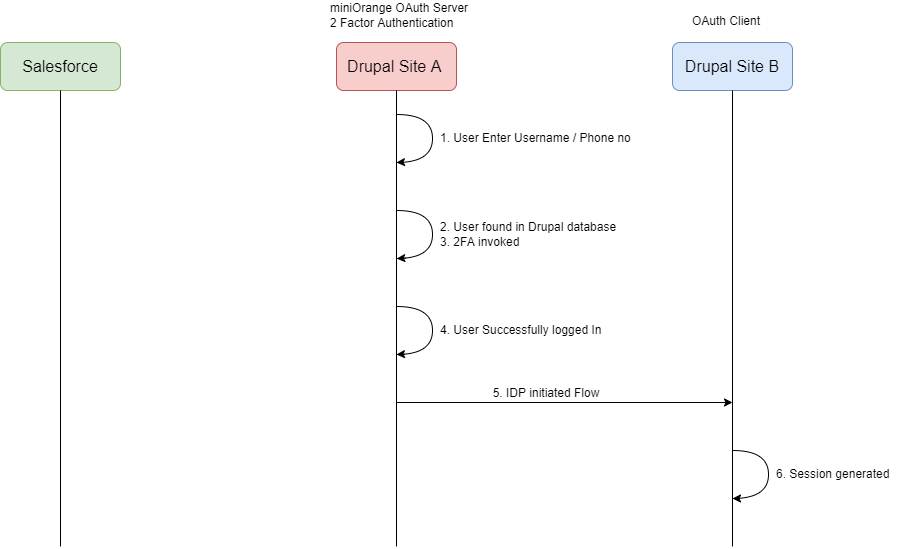 Fig 1.1: User Present in Drupal Databased in Site A
- When the user details are not available at Drupal site but present at Salesforce
When the user attempts to log in with their username/phone number, the user's account wouldn’t be available at the Drupal website. The 2FA module was customized such that it would initiate the Salesforce suite module services to pull all the contacts from Salesforce and create users that do not already exist at the Drupal website. The Salesforce suite mapping component handles the mapping of the contact fields with the user's profile fields.
Now, if the user contact is available at Salesforce, they would be pulled and made available at the Drupal site as well. The inline 2FA registration flow is invoked. After successful validation, the user would be logged in and would be able to access site B through the link at the Site A dashboard.
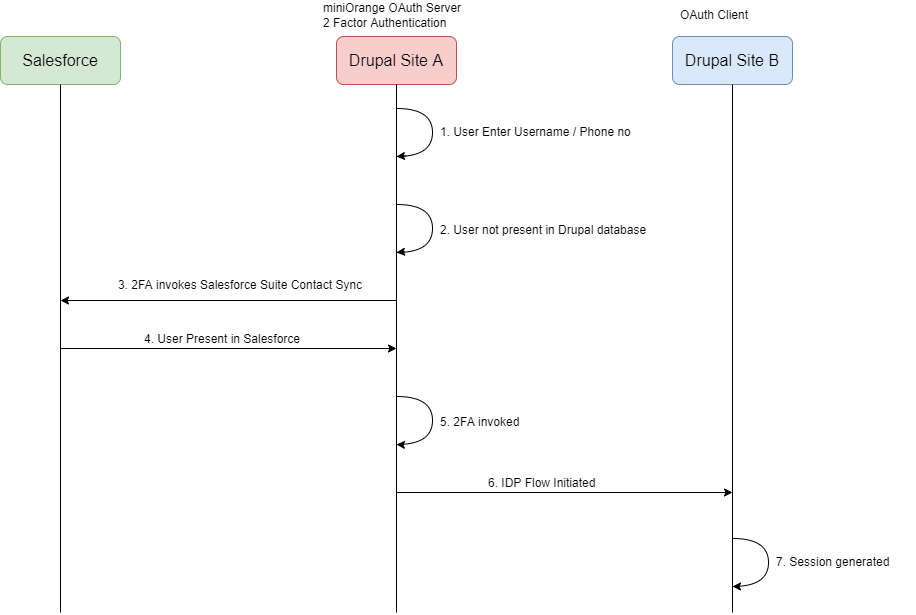 Fig 1.2: User not found in Drupal Database; User Present in Salesforce Contacts
- When the user details aren’t available at Drupal site as well as Salesforce
When the user attempts a login, he/she is not present in the Drupal database at Site A. The 2FA module custom function triggers the Salesforce suite module to pull all the contacts from Salesforce and create users that do not already exist at the Drupal website.
If the user is not present/registered at Salesforce as well, then the user gets an alert with the link to create his/her contact on the Salesforce site. After successful contact creation at Salesforce end, a similar flow to Case 2 follows and the user gets logged in to Site A.
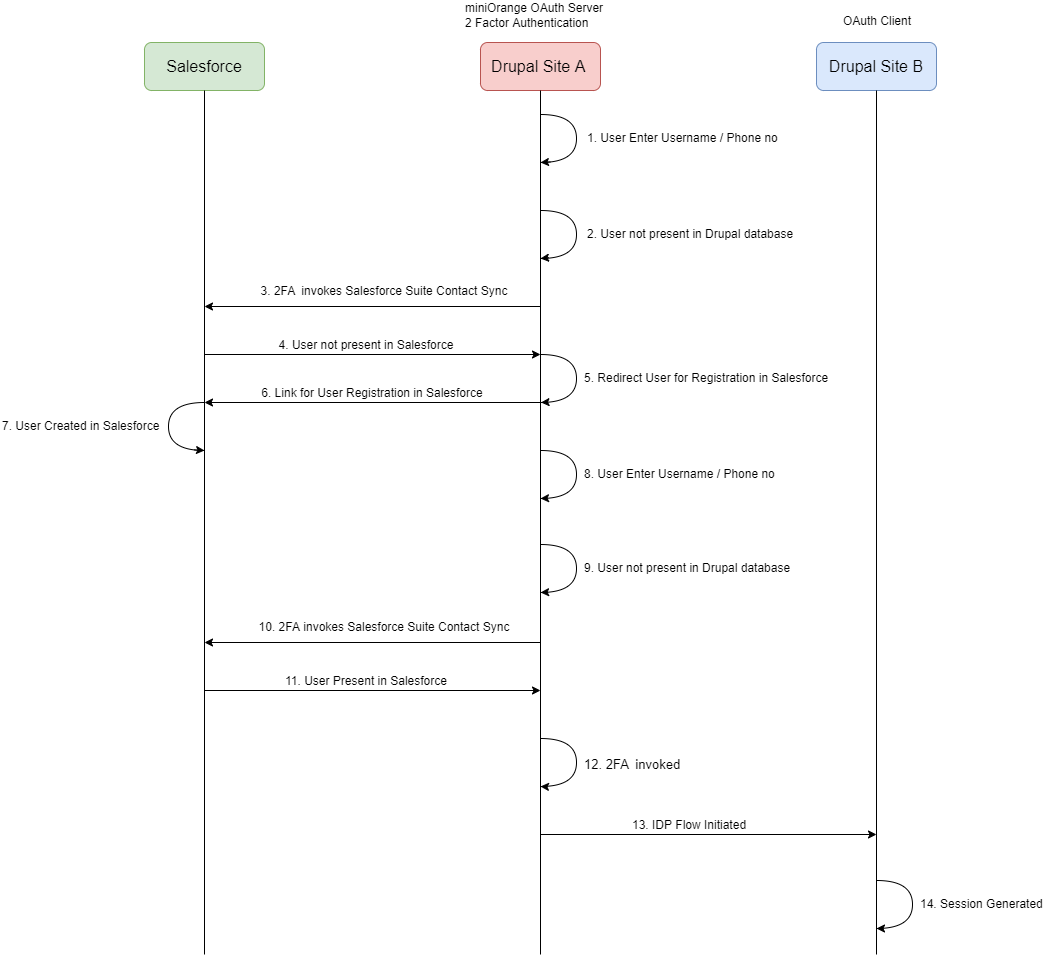 Fig 1.3: User not found in Both Drupal Database and Salesforce
Why Drupal was chosen
Drupal was a natural choice for both the parties as -
-
The Women For Women’s two independent sites under-discussion were running over Drupal.
-
It provides a highly flexible and scalable development foundation that can be customized to the organization's specific needs.
-
The Drupal modules customized to devise the solutions are pre-existing extensions on Drupal itself.
-
It's an open source software with no licensing costs.
Technical Specifications
Drupal version:
Key modules/theme/distribution used: